# Introduction

Understand the MusePay platform and find the right documentation for your integration.

MusePay provides API infrastructure for embedding crypto payments, card issuing, asset management, conversion, and fiat payouts into your product. A consistent API model lets your system use these capabilities while MusePay handles the underlying payment and financial operations.

## How MusePay works

MusePay integrations combine three components:

* **APIs** initiate operations and retrieve information from your backend.
* **Partner Portal** supports operational tasks such as managing API access, account funding, and configuration.
* **Webhooks** notify your system about asynchronous order and card events.

## How this documentation is organized

* **Getting Started** covers the common setup checklist and helps you choose the appropriate product integration.
* **Integration** explains end-to-end workflows, implementation decisions, and operational behavior.
* **API Reference** defines endpoints, request parameters, response fields, and supporting enums.

## Next step

Start with the setup checklist, then continue to the integration guide that matches your use case.

{% content-ref url="/pages/U5TCN1aUaXusm2oOgSEe" %}
[Getting Started](/getting-started)
{% endcontent-ref %}


# Getting Started

Set up API access and make your first MusePay integration decisions.

The MusePay API follows REST conventions. Endpoints use resource-oriented URLs, accept JSON request bodies, return JSON responses, and use standard HTTP methods and response codes.

## Integration checklist

1. Review [Supported Assets](/reference/supported-assets) to confirm the currencies and networks required by your product.
2. Follow [Authentication](/integration/authentication) to generate your RSA key pair, upload the public key, and sign API requests.
3. Choose an API from the [API Reference](/reference/api-reference) and review its request parameters and response objects.
4. Implement the relevant [webhooks](/integration/webhook) so your system can react to asynchronous order and card events.
5. Test the complete flow before enabling it for your customers.

{% hint style="info" %}
Keep private keys in a secure server-side environment. Never expose them in browser or mobile application code.
{% endhint %}

## Choose an integration

### Acquiring API

Accept crypto payments using either a reusable address for each user with Wallet Mode or a temporary address for each order with Checkout Mode. The guide also covers multi-chain checkout, specified-chain checkout, payment amount differences, and webhook-based reconciliation.

{% content-ref url="/pages/Ee8HGi6nU0yGQBTFvhYZ" %}
[Acquiring API](/integration/acquiring-api)
{% endcontent-ref %}

### Card API

Create cardholders, issue and manage cards, fund card accounts, and handle card transaction verification. Follow the integration workflows first, then use the Card API Reference for endpoint details.

{% content-ref url="/pages/Q986UgkMuTWSey5a8yZB" %}
[Card API](/integration/card-api)
{% endcontent-ref %}

### Fiat Payout API

Send fiat currency from your USDT balance to third-party bank accounts. The integration guide explains how to discover supported routes, create a quote, submit the payout, and track its asynchronous status.

{% content-ref url="/pages/jpCW6bV9MVQqDn9lJzzw" %}
[Fiat Payout API](/integration/fiat-payout-api)
{% endcontent-ref %}


# Authentication

Configure RSA credentials and sign requests to the MusePay API.

MusePay authenticates API requests with RSA signatures. You generate and retain the private key, then upload the corresponding public key to MusePay. MusePay never needs access to your private key.

## Generate an RSA key pair

Generate a 2048-bit RSA private key in PKCS #8 PEM format, then export its public key:

```bash
openssl genpkey -algorithm RSA -out muse_secret.key -pkeyopt rsa_keygen_bits:2048
openssl pkey -in muse_secret.key -pubout -out muse_public.key
```

A private key file has the following format. The middle of this example is masked and is not a usable key:

```
-----BEGIN PRIVATE KEY-----
MIIEvQIBADANBgkqhkiG9w0BAQEFAASCBKcwggSj...REDACTED...AQAB
-----END PRIVATE KEY-----
```

{% hint style="danger" %}
Store `muse_secret.key` securely. Never upload it, send it to MusePay, commit it to source control, print it in logs, or embed it in client-side code.
{% endhint %}

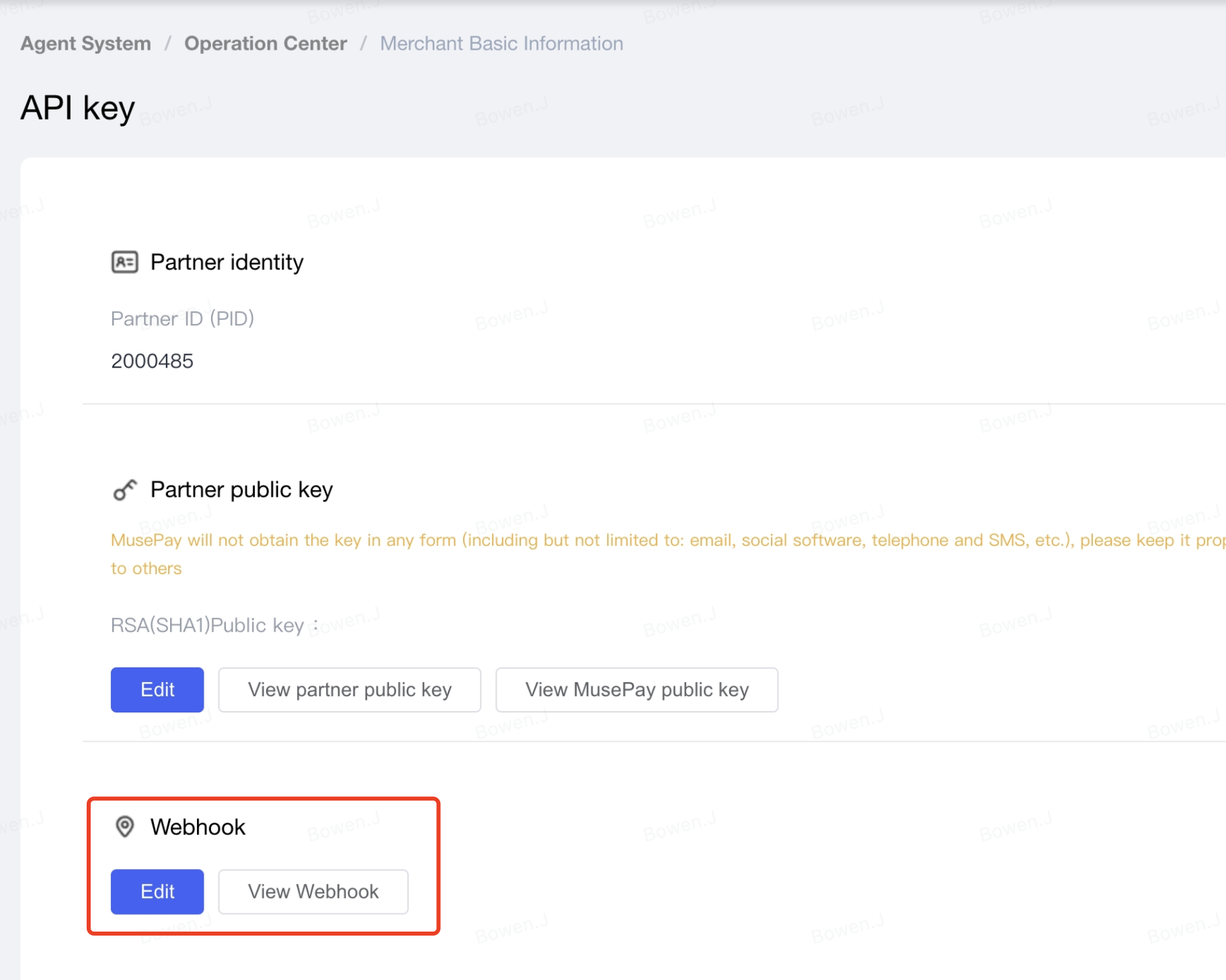
Open the [Partner Portal](https://partner.musepay.io), go to the **API Key** tab, and configure your partner public key by uploading the contents of `muse_public.key`. MusePay uses this key to verify your API request signatures.

Before uploading, remove the `-----BEGIN PUBLIC KEY-----` and `-----END PUBLIC KEY-----` lines, then remove all line breaks. Upload only the remaining Base64-encoded public key as a single line.

<figure><img src="https://4031060132-files.gitbook.io/~/files/v0/b/gitbook-x-prod.appspot.com/o/spaces%2F847OCU8wHOemogNwwSWc%2Fuploads%2Fgit-blob-7e55746d6e616e348aeffd754916b811abe1f802%2Fimage%20(15).png?alt=media" alt="Partner Portal API Key page showing the Partner ID and public-key configuration"><figcaption><p>Configure your public key and download the MusePay public key in the Partner Portal.</p></figcaption></figure>

Download and store the MusePay public key as well. You use the MusePay public key—not your partner public key—to verify signed [webhook notifications](/integration/webhook).

## Required authentication fields

Include the following fields in every API request body. Endpoint-specific fields must be included in the same body before the signature is generated.

| Name         | Type   | Description                                                                                            |
| ------------ | ------ | ------------------------------------------------------------------------------------------------------ |
| `partner_id` | String | Partner ID shown in the Partner Portal.                                                                |
| `sign_type`  | String | Fixed value: `RSA`.                                                                                    |
| `timestamp`  | String | Current 10-digit Unix timestamp in seconds.                                                            |
| `nonce`      | String | Unique random value for this request. Do not reuse a nonce; duplicates within 60 seconds are rejected. |
| `sign`       | String | Base64-encoded RSA signature generated as described below.                                             |

See [Common Parameters](/reference/api-reference/common-parameters) for the shared request-field reference.

## Build the signature

Use the exact request values that you will send to MusePay:

1. Remove the `sign` field.
2. Exclude fields whose values are `null` or an empty string.
3. Sort the remaining fields by field name in ascending, case-sensitive alphabetical order.
4. Format each field as `key=value` and join the pairs with `&`. Do not URL-encode this canonical string.
5. Encode the canonical string as UTF-8 and sign it with your RSA private key using `SHA1WithRSA`.
6. Base64-encode the generated signature and send it as `sign`.

{% hint style="warning" %}
`SHA1WithRSA` is the algorithm required by the current MusePay API. Do not substitute a different signature algorithm unless MusePay confirms that your integration has been migrated.
{% endhint %}

### Example payload

The unsigned request body:

```json
{
  "partner_id": "200001",
  "request_id": "202609110001",
  "sign_type": "RSA",
  "timestamp": "1789056000",
  "nonce": "5K8264ILTKCH16CQ2502SI8ZNMTM67VS"
}
```

The canonical string is:

```
nonce=5K8264ILTKCH16CQ2502SI8ZNMTM67VS&partner_id=200001&request_id=202609110001&sign_type=RSA&timestamp=1789056000
```

After signing, add the Base64-encoded result to the request body:

```json
{
  "partner_id": "200001",
  "request_id": "202609110001",
  "sign_type": "RSA",
  "timestamp": "1789056000",
  "nonce": "5K8264ILTKCH16CQ2502SI8ZNMTM67VS",
  "sign": "<Base64-encoded RSA signature>"
}
```

## Code examples

The examples below read the private key from `muse_secret.key`. Keep this file outside your source repository and restrict access to it.

<details>

<summary>Java</summary>

```java
import java.nio.charset.StandardCharsets;
import java.nio.file.Files;
import java.nio.file.Path;
import java.security.KeyFactory;
import java.security.PrivateKey;
import java.security.Signature;
import java.security.spec.PKCS8EncodedKeySpec;
import java.time.Instant;
import java.util.Base64;
import java.util.HashMap;
import java.util.Map;
import java.util.UUID;
import java.util.stream.Collectors;

static String canonicalize(Map<String, ?> params) {
    return params.entrySet().stream()
        .filter(entry -> !"sign".equals(entry.getKey()))
        .filter(entry -> entry.getValue() != null)
        .filter(entry -> !String.valueOf(entry.getValue()).isEmpty())
        .sorted(Map.Entry.comparingByKey())
        .map(entry -> entry.getKey() + "=" + entry.getValue())
        .collect(Collectors.joining("&"));
}

static PrivateKey loadPrivateKey(Path path) throws Exception {
    String pem = Files.readString(path, StandardCharsets.UTF_8)
        .replace("-----BEGIN PRIVATE KEY-----", "")
        .replace("-----END PRIVATE KEY-----", "")
        .replaceAll("\\s", "");
    byte[] keyBytes = Base64.getDecoder().decode(pem);
    return KeyFactory.getInstance("RSA")
        .generatePrivate(new PKCS8EncodedKeySpec(keyBytes));
}

static String sign(String content, PrivateKey privateKey) throws Exception {
    Signature signer = Signature.getInstance("SHA1WithRSA");
    signer.initSign(privateKey);
    signer.update(content.getBytes(StandardCharsets.UTF_8));
    return Base64.getEncoder().encodeToString(signer.sign());
}

Map<String, Object> requestBody = new HashMap<>();
requestBody.put("partner_id", "200001");
requestBody.put("request_id", "202609110001");
requestBody.put("sign_type", "RSA");
requestBody.put("timestamp", String.valueOf(Instant.now().getEpochSecond()));
requestBody.put("nonce", UUID.randomUUID().toString().replace("-", ""));

PrivateKey privateKey = loadPrivateKey(Path.of("muse_secret.key"));
requestBody.put("sign", sign(canonicalize(requestBody), privateKey));
```

</details>

<details>

<summary>JavaScript (Node.js)</summary>

```javascript
import { readFileSync } from 'node:fs'
import { randomUUID, sign } from 'node:crypto'

function canonicalize(params) {
  return Object.entries(params)
    .filter(([key, value]) => key !== 'sign' && value !== null && value !== undefined && value !== '')
    .sort(([left], [right]) => left < right ? -1 : left > right ? 1 : 0)
    .map(([key, value]) => `${key}=${value}`)
    .join('&')
}

const requestBody = {
  partner_id: '200001',
  request_id: '202609110001',
  sign_type: 'RSA',
  timestamp: Math.floor(Date.now() / 1000).toString(),
  nonce: randomUUID().replaceAll('-', '')
}

const privateKey = readFileSync('muse_secret.key', 'utf8')
const content = canonicalize(requestBody)
requestBody.sign = sign('RSA-SHA1', Buffer.from(content, 'utf8'), privateKey).toString('base64')
```

</details>

<details>

<summary>PHP</summary>

```php
<?php
$requestBody = [
    "partner_id" => "200001",
    "request_id" => "202609110001",
    "sign_type" => "RSA",
    "timestamp" => (string) time(),
    "nonce" => bin2hex(random_bytes(16))
];

$signingFields = array_filter(
    $requestBody,
    fn($value, $key) => $key !== "sign" && $value !== null && $value !== "",
    ARRAY_FILTER_USE_BOTH
);
ksort($signingFields, SORT_STRING);

$pairs = [];
foreach ($signingFields as $key => $value) {
    $pairs[] = $key . "=" . $value;
}
$content = implode("&", $pairs);

$privateKeyPem = file_get_contents("muse_secret.key");
if ($privateKeyPem === false) {
    throw new RuntimeException("Unable to read the private key");
}

if (!openssl_sign($content, $signature, $privateKeyPem, OPENSSL_ALGO_SHA1)) {
    throw new RuntimeException("Unable to sign the request");
}

$requestBody["sign"] = base64_encode($signature);
```

</details>

## Troubleshooting signature errors

If MusePay rejects a signature, verify that:

* the public key uploaded in the Partner Portal matches the private key used to sign the request;
* the canonical string contains every non-empty request field except `sign`;
* field names and values exactly match the final request body;
* fields are sorted by name and are not URL-encoded;
* the content is UTF-8 encoded and signed with `SHA1WithRSA`;
* `timestamp` is a 10-digit Unix timestamp in seconds; and
* a new `nonce` is generated for every request.


# IP Whitelisting

Restrict API access to approved server IP addresses.

MusePay can restrict API requests associated with your partner account so that they are accepted only from approved IP addresses.

To configure an IP whitelist, contact MusePay Technical Support and provide:

* The Partner ID (`partner_id`) to configure.
* The public outbound IP address of each server that will call the MusePay API.

{% hint style="warning" %}
Never send your private key to MusePay or any third party. MusePay only needs your Partner ID and the IP addresses to configure the whitelist.
{% endhint %}

Use stable outbound IP addresses. Requests originating from an address that is not on the whitelist will not be accepted.


# Acquiring API

Choose and integrate the MusePay crypto acquiring mode that fits your payment flow.

MusePay supports two crypto acquiring modes. Choose **Wallet Mode (Dedicated User Address)** when each user needs a reusable deposit address, or **Checkout Mode (Per-Order Address Allocation)** when your system creates a payment order before every payment.

Both modes notify your system after a deposit is detected. The main difference is when you create the local order and how long the receiving address remains associated with the payment context.

## Choose an integration mode

|                    | Wallet Mode (Dedicated User Address)               | Checkout Mode (Per-Order Address Allocation)          |
| ------------------ | -------------------------------------------------- | ----------------------------------------------------- |
| Address allocation | One fixed address for each user                    | One temporary address for each order                  |
| Address lifetime   | Reusable for future deposits                       | Valid for one day by default                          |
| Local order timing | Create it after receiving the deposit notification | Create it before requesting a payment address         |
| Amount handling    | Credit the actual amount reported by MusePay       | Reconcile the deposit against the amount in the order |
| Best suited for    | Wallet top-ups, stored balances, recurring users   | E-commerce checkout and one-time payments             |

## Wallet Mode (Dedicated User Address)

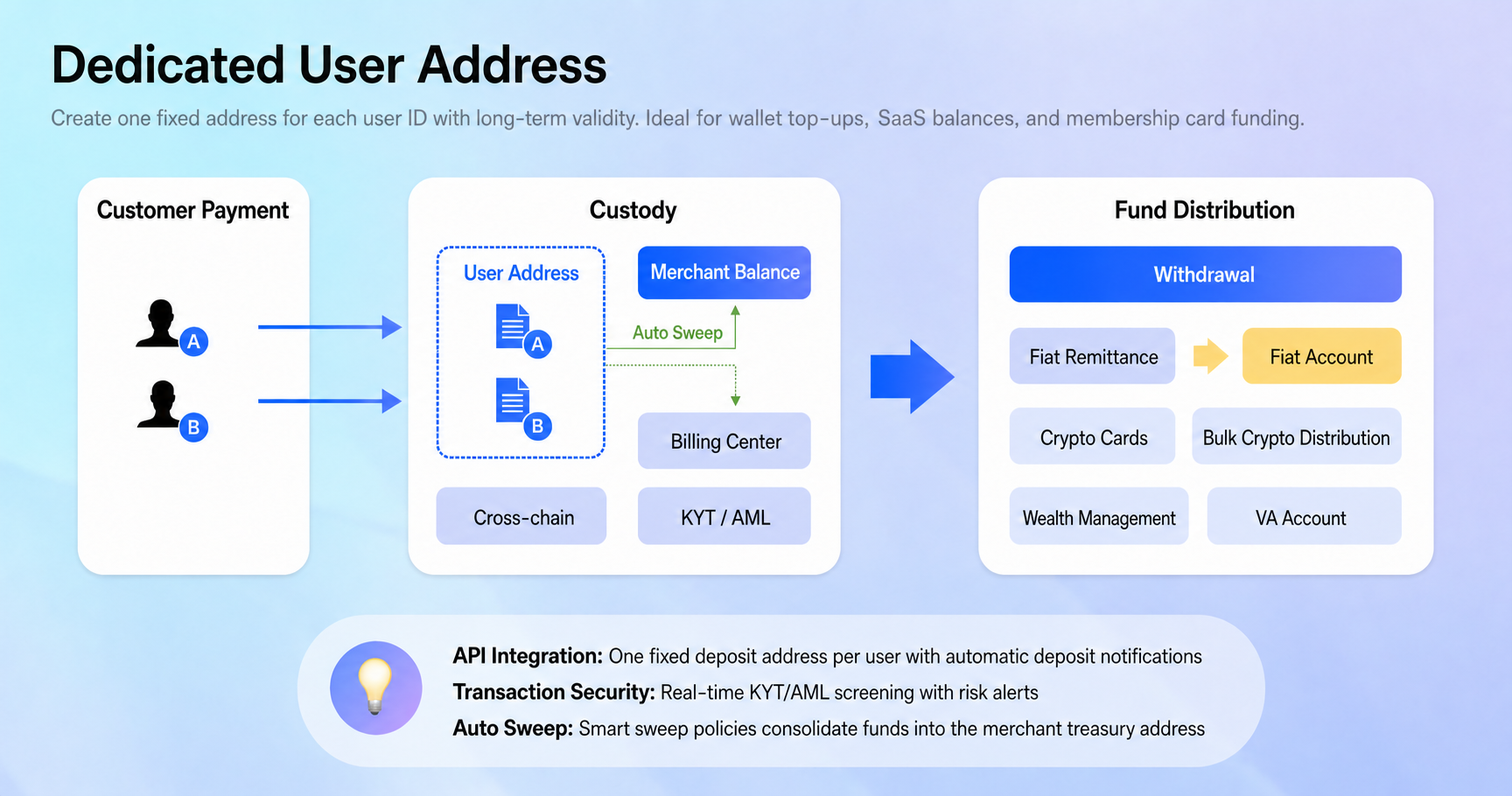
Wallet Mode assigns a fixed deposit address to each user. The user can deposit to that address at any time. After MusePay detects and confirms the deposit, it sends your system an order webhook with the received amount. Your system then creates a local order and credits the user's balance.

<figure><img src="https://4031060132-files.gitbook.io/~/files/v0/b/gitbook-x-prod.appspot.com/o/spaces%2F847OCU8wHOemogNwwSWc%2Fuploads%2Fgit-blob-5ba964aa575472d8d02f0d914aed2bd6b0c4cf4f%2Facquiring-wallet-mode.png?alt=media" alt="Dedicated User Address flow"><figcaption><p>One reusable deposit address is associated with each user.</p></figcaption></figure>

### Integration flow

1. Complete [Authentication](/integration/authentication) and implement [order webhooks](/integration/webhook/order).
2. Call the [Deposit Address](/reference/api-reference/acquiring-api/wallet-mode#deposit-address) endpoint with the asset and your `customer_ref_id` to obtain the user's address.
3. Store the relationship between the user, asset, and returned address.
4. Allow the user to deposit to the address whenever needed.
5. When the webhook arrives, verify it and use the reported amount and `customerRefId` to create a local order and credit the correct user.
6. Use the [Query](/reference/api-reference/acquiring-api/wallet-mode#query) endpoint when you need to retrieve the transaction details.

{% hint style="warning" %}
Treat webhook processing as idempotent. The same event must not credit a user's balance more than once.
{% endhint %}

## Checkout Mode (Per-Order Address Allocation)

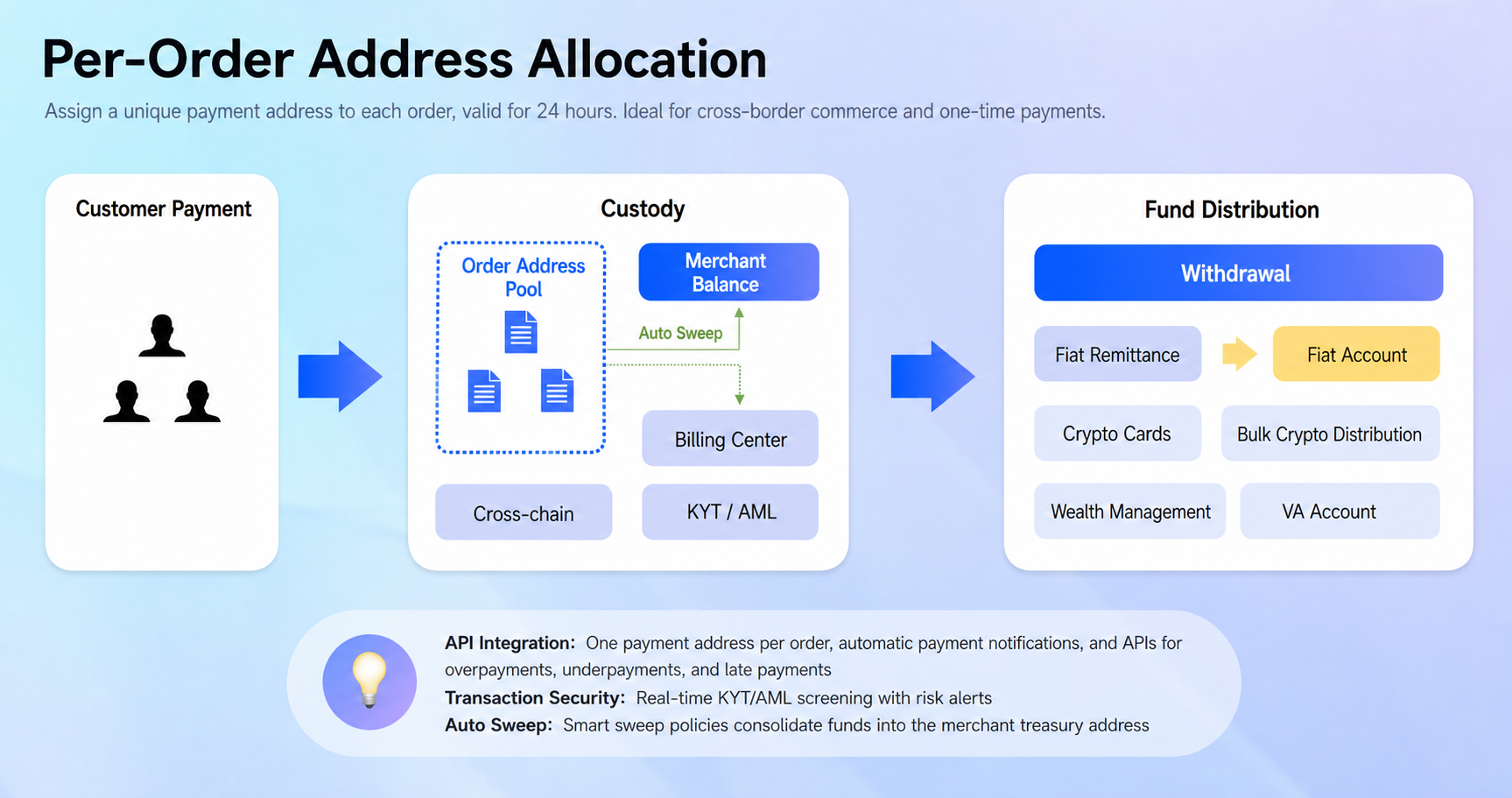
Checkout Mode creates a new payment context for each order. Your system creates the order first, and MusePay returns a temporary receiving address that is valid for one day by default. MusePay sends an order webhook after the user deposits.

<figure><img src="https://4031060132-files.gitbook.io/~/files/v0/b/gitbook-x-prod.appspot.com/o/spaces%2F847OCU8wHOemogNwwSWc%2Fuploads%2Fgit-blob-b2134347b6c790a888f821b805852a7baf44d6d4%2Facquiring-order-mode.png?alt=media" alt="Per-Order Address Allocation flow"><figcaption><p>Each order receives its own temporary payment address.</p></figcaption></figure>

### Integration flow

1. Complete [Authentication](/integration/authentication) and implement [order webhooks](/integration/webhook/order).
2. Create the local order in your system with a unique request ID and the expected amount.
3. Call [Create Checkout Order](/reference/api-reference/acquiring-api/checkout-mode#create-checkout-order) to obtain the order number, receiving address, and checkout URL.
4. Present the address or checkout URL to the user before it expires.
5. When the webhook arrives, verify it and reconcile the reported payment with your local order before fulfilling it.
6. Use [Query Order](/reference/api-reference/acquiring-api/query-order) to retrieve the latest order status when needed.

{% content-ref url="/pages/XI9bfA8ABdjduaNk4pZj" %}
[Checkout Payment Methods](/integration/acquiring-api/checkout-payment-methods)
{% endcontent-ref %}

{% hint style="info" %}
Payments can be underpaid, overpaid, or received after the address expires. Review [Checkout Payment Amount Handling](/integration/acquiring-api/checkout-payment-amount-handling) before defining your fulfillment rules, and base fulfillment on the webhook or query result rather than the initial create-order response.
{% endhint %}

{% content-ref url="/pages/AOFk2tim2pUyjnItChNX" %}
[Checkout Payment Amount Handling](/integration/acquiring-api/checkout-payment-amount-handling)
{% endcontent-ref %}

## Related references

* [Supported Assets](/reference/supported-assets)
* [Wallet Mode endpoints](/reference/api-reference/acquiring-api/wallet-mode)
* [Checkout Mode endpoint](/reference/api-reference/acquiring-api/checkout-mode)
* [Checkout Payment Methods](/integration/acquiring-api/checkout-payment-methods)
* [Checkout Payment Amount Handling](/integration/acquiring-api/checkout-payment-amount-handling)
* [Order webhook](/integration/webhook/order)
* [Order statuses](/reference/enums/order-status)


# Checkout Payment Methods

Choose between multi-chain and specified-chain Checkout Mode payments.

Checkout Mode supports two payment experiences controlled by `payment_method`. Choose whether the user can select a supported USDT network on the checkout page or whether your order requires a specific network.

## At a glance

| Checkout experience      | `payment_method` | `currency` or `pay_currency`                | User experience                                                                    |
| ------------------------ | ---------------- | ------------------------------------------- | ---------------------------------------------------------------------------------- |
| Multi-chain checkout     | `on_line`        | `USDT`                                      | The checkout page lets the user choose any supported network for USDT.             |
| Specified-chain checkout | `on_chain`       | A chain-specific asset such as `USDT_TRC20` | The checkout page and returned payment address are fixed to the specified network. |

## Which currency field to use

The field depends on how the order amount is denominated:

* For a crypto-denominated order, set `currency` to `USDT` or a chain-specific USDT asset.
* For a fiat-denominated order, set `currency` to the fiat currency and use `pay_currency` to control how the user pays.

## Multi-chain checkout with `on_line`

Use `payment_method=on_line` when you want the user to choose the payment network on the hosted checkout page. Set the applicable payment asset field to the generic `USDT` code.

For a crypto-denominated order, the relevant fields are:

```json
{
  "payment_method": "on_line",
  "currency": "USDT"
}
```

For a fiat-denominated order, keep the fiat currency in `currency` and set `pay_currency` to `USDT`:

```json
{
  "payment_method": "on_line",
  "currency": "IDR",
  "pay_currency": "USDT"
}
```

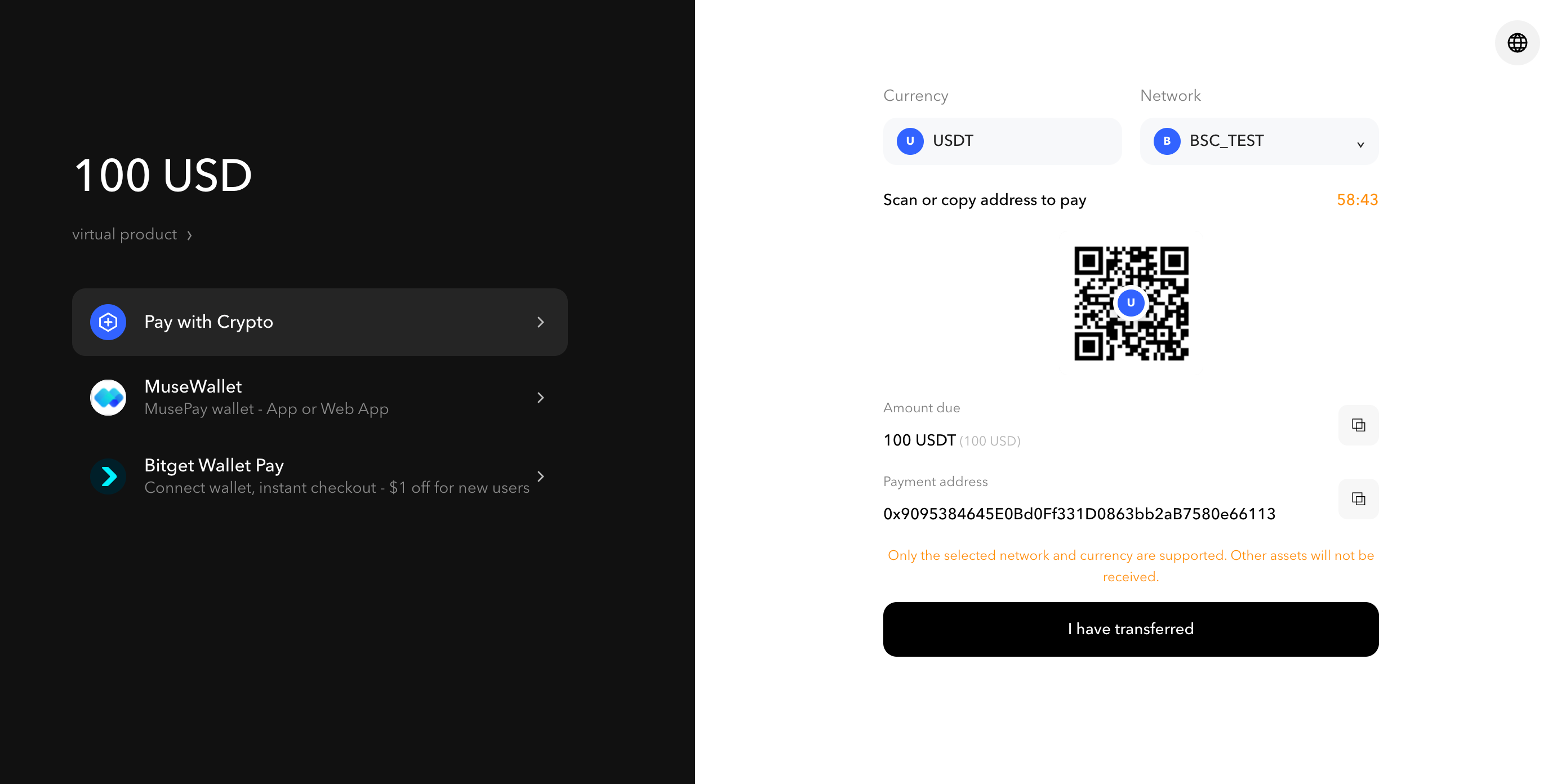
The user can then choose any USDT network supported by MusePay.

<figure><img src="https://4031060132-files.gitbook.io/~/files/v0/b/gitbook-x-prod.appspot.com/o/spaces%2F847OCU8wHOemogNwwSWc%2Fuploads%2Fgit-blob-1ea6742e7369b5d388e296a211c1ad6d988bac64%2Fcheckout-on-line.png?alt=media" alt="Hosted checkout generated with payment_method set to on_line"><figcaption><p>The <code>on_line</code> checkout lets the user select a supported USDT network before paying.</p></figcaption></figure>

{% content-ref url="/pages/HoJQJEilKz0f3nEgwNJ0" %}
[Multiple Chain Checkout](/reference/api-reference/acquiring-api/checkout-mode/multiple-chain-checkout)
{% endcontent-ref %}

## Specified-chain checkout with `on_chain`

Use `payment_method=on_chain` when the order must be paid on a specific network. Set the applicable payment asset field to a chain-specific code such as `USDT_TRC20`.

For a crypto-denominated order, the relevant fields are:

```json
{
  "payment_method": "on_chain",
  "currency": "USDT_TRC20"
}
```

For a fiat-denominated order, keep the fiat currency in `currency` and specify the network in `pay_currency`:

```json
{
  "payment_method": "on_chain",
  "currency": "IDR",
  "pay_currency": "USDT_TRC20"
}
```

The hosted checkout page and the address returned for the order will accept USDT on that network only.

{% content-ref url="/pages/OAfroRDTw59IpAnZrZWq" %}
[Specified Chain Checkout](/reference/api-reference/acquiring-api/checkout-mode/specified-chain-checkout)
{% endcontent-ref %}

{% hint style="warning" %}
Use the generic `USDT` code only with `on_line`. With `on_chain`, select a chain-specific USDT code from [Supported Assets](/reference/supported-assets). Sending funds over a different network may result in the payment not being credited.
{% endhint %}

## Related references

* [Create Checkout Order](/reference/api-reference/acquiring-api/checkout-mode)
* [Checkout Payment Amount Handling](/integration/acquiring-api/checkout-payment-amount-handling)
* [Order webhook](/integration/webhook/order)


# Checkout Payment Amount Handling

Handle exact, underpaid, and overpaid Checkout Mode payments.

In Checkout Mode, the amount a user sends may differ from the amount requested by the order. Your integration must distinguish the expected order amount from the amount actually paid before deciding how much value to credit to the user.

## Default behavior

By default, a Checkout Mode order succeeds and MusePay sends the successful payment notification only when the user's payment amount exactly matches the order amount:

```
pay_amount = order_amount
```

## Allowing underpayments and overpayments

We recommend allowing orders to succeed when a user pays less or more than the order amount. When underpayments and overpayments are accepted, MusePay processes the amount actually received, sends it in the [order webhook](/integration/webhook/order), and credits the resulting net amount to your merchant balance.

{% hint style="info" %}
To enable underpayments and overpayments, contact the MusePay Operations Team to configure this option for your account.
{% endhint %}

The webhook amount fields have the following meanings:

| Field           | Meaning                                                                     |
| --------------- | --------------------------------------------------------------------------- |
| `order_amount`  | The amount requested when the Checkout Mode order was created.              |
| `pay_amount`    | The amount actually paid by the user.                                       |
| `fee_amount`    | The service fee calculated from `pay_amount`.                               |
| `actual_amount` | The net amount credited to your merchant balance after the fee is deducted. |

The calculation is:

```
fee_amount = pay_amount × fee rate
actual_amount = pay_amount - fee_amount
```

MusePay calculates the fee from the amount actually paid, not from the original order amount. This applies to both underpayments and overpayments.

## Example: underpayment

Assume the order amount is `100 USDT`, the user pays `99 USDT`, and the fee rate is `1%`.

| Field           | Value        | Calculation              |
| --------------- | ------------ | ------------------------ |
| `order_amount`  | `100 USDT`   | Original order amount    |
| `pay_amount`    | `99 USDT`    | Amount actually received |
| `fee_amount`    | `0.99 USDT`  | `99 × 1%`                |
| `actual_amount` | `98.01 USDT` | `99 - 0.99`              |

The webhook reports these values, and MusePay credits `98.01 USDT` to your merchant balance.

## Choose your user-crediting policy

MusePay credits the merchant balance based on the payment received. Your system remains responsible for deciding whether and how to credit the end user.

Common approaches include:

{% hint style="info" %}
Choose one of the following mutually exclusive policies for each Checkout flow. These policies are alternatives and should not be applied cumulatively.
{% endhint %}

### Option 1: Require an exact payment

Credit the user only when the two amounts match:

```
pay_amount = order_amount
```

### Option 2: Allow a configured tolerance

Credit the user only when the absolute difference is within a limit defined by your business:

```
abs(pay_amount - order_amount) <= configured tolerance
```

### Option 3: Credit the amount actually paid

Credit the user according to `pay_amount`, regardless of the original `order_amount`.

{% hint style="warning" %}
Use decimal arithmetic when comparing or calculating currency amounts, and process webhooks idempotently so the same payment cannot credit a user more than once.
{% endhint %}

## Related references

* [Acquiring API integration guide](/integration/acquiring-api)
* [Create Checkout Order](/reference/api-reference/acquiring-api/checkout-mode)
* [Order webhook fields](/integration/webhook/order)
* [Query Order](/reference/api-reference/acquiring-api/query-order)


# Card API

Integrate cardholder onboarding, card issuance, funding, management, and transaction verification.

The MusePay Card API lets partners build a complete card experience into their products. Create and manage cardholders, issue cards, manage card status and settings, fund card accounts, and respond to transaction verification requests.

## Integration workflows

{% content-ref url="/pages/XCxwOKqBTAKjTMdGBmqP" %}
[How to Issue a Card](/integration/card-api/how-to-issue-a-card)
{% endcontent-ref %}

{% content-ref url="/pages/6ii11q1PeNlMX6YSFstr" %}
[Card Transactions Verification](/integration/card-api/card-transactions-verification)
{% endcontent-ref %}

## API reference

Use these endpoint references while implementing the workflows:

* [Card User](/reference/api-reference/card-api/card-user) — create cardholders and manage identity and KYC information.
* [Card](/reference/api-reference/card-api/card) — issue, retrieve, activate, lock, update, or replace cards and respond to verification requests.
* [Card Account](/reference/api-reference/card-api/card-account) — top up cards and query card account transactions.


# How to Issue a Card

<figure><img src="https://4031060132-files.gitbook.io/~/files/v0/b/gitbook-x-prod.appspot.com/o/spaces%2F847OCU8wHOemogNwwSWc%2Fuploads%2Fgit-blob-df60090d2cee3208a1f448b0cf7d23de64a40604%2Fimage%20(10).png?alt=media" alt=""><figcaption></figcaption></figure>

### 1. Get Card Product ID

When issuing a card, specify `productId` to identify the card product. The selected product determines the card type, design, features, benefits, interest rates, and capabilities. Your solution manager will provide the available product IDs. You can also retrieve them from the [Partner Portal](https://partner.musepay.io/).

### 2. Create Card Holder

Follow [Authentication](/integration/authentication) to set up API access. Then create a cardholder using the [Card User](/reference/api-reference/card-api/card-user) endpoints.

### 3. Apply a Card

Once the cardholder is created, submit a card application using the [Apply Card](/reference/api-reference/card-api/card#apply-card) endpoint.

### 4. Top Up

* First, deposit digital assets into your partner basic account. In the Partner Portal, go to **Balance → Deposit Coin** to obtain a deposit address. After the transaction is confirmed on-chain, the funds will be credited to your partner basic account.

<figure><img src="https://4031060132-files.gitbook.io/~/files/v0/b/gitbook-x-prod.appspot.com/o/spaces%2F847OCU8wHOemogNwwSWc%2Fuploads%2Fgit-blob-e0ebeba8ca49afd401c3c2c41a90cdde791f65b8%2Fimage%20(13).png?alt=media" alt=""><figcaption></figcaption></figure>

* Then use the [Top Up Card](/reference/api-reference/card-api/card-account#top-up-card) endpoint. MusePay transfers the specified amount from your partner basic account to the selected card account.

  <br>


# Card Transactions Verification

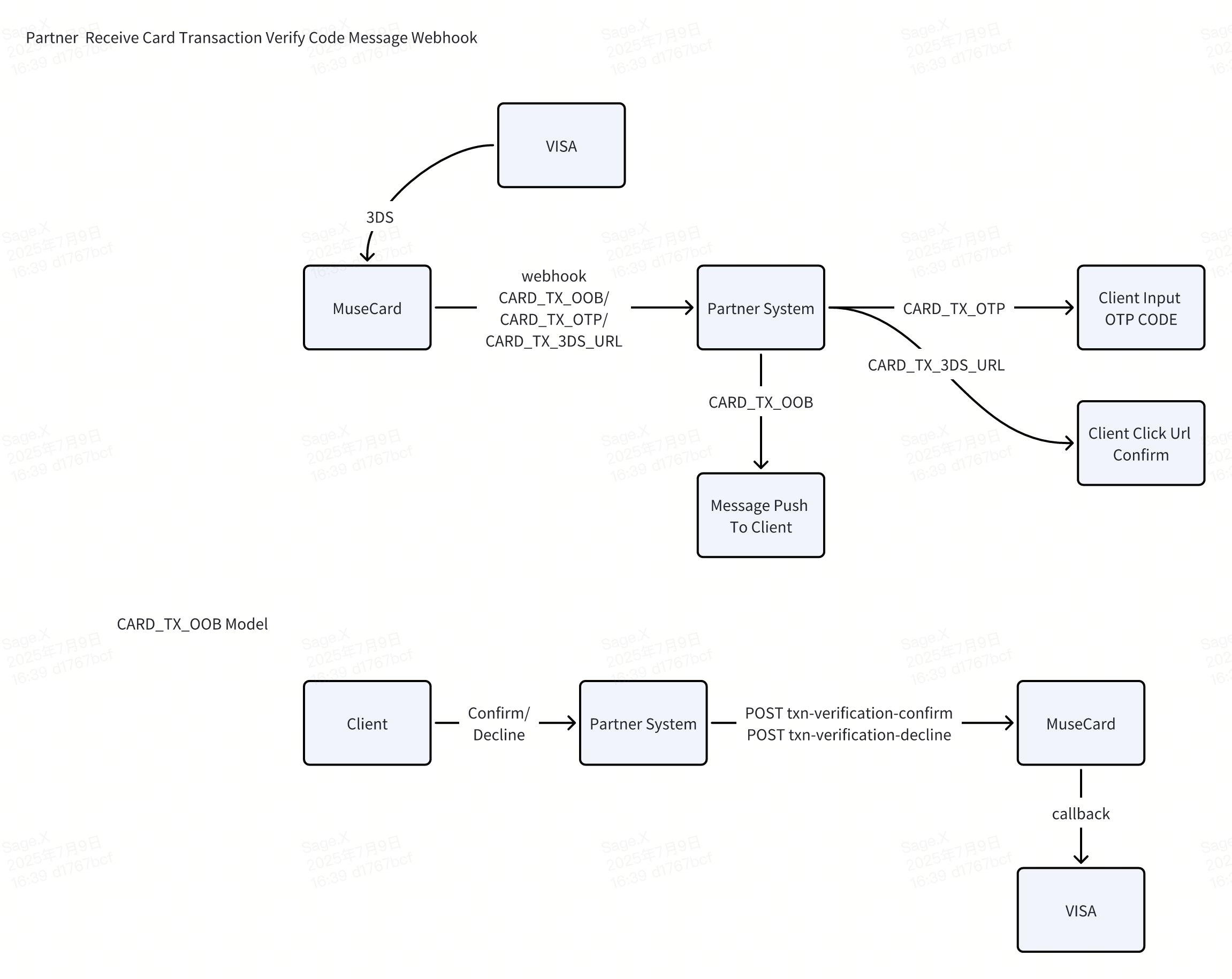
This document describes the workflow for verifying card transactions via webhook integration. It outlines how partners can receive transaction verification messages and interact with clients to complete the verification process.

<figure><img src="https://4031060132-files.gitbook.io/~/files/v0/b/gitbook-x-prod.appspot.com/o/spaces%2F847OCU8wHOemogNwwSWc%2Fuploads%2Fgit-blob-776c34f6f177fc83fa0010d9c70abde6a0ab9965%2Fimage.png?alt=media" alt=""><figcaption></figcaption></figure>

### Workflow Overview

#### Step 1: Verification Trigger

* When a transaction requires verification (such as 3DS or OTP), VISA triggers the process.
* MuseCard receives the verification event from VISA.

#### Step 2: Webhook Notification to Partner System

MuseCard sends a webhook notification to the Partner System:

* CARD\_TX\_OOB: Out-of-band verification (client confirmation required).
* CARD\_TX\_OTP: One-time password (OTP) verification.
* CARD\_TX\_3DS\_URL: 3D Secure verification URL.

#### Step 3: Client Interaction

The Partner System forwards the verification message to the client:

* For CARD\_TX\_OTP, the client inputs the OTP code.
* For CARD\_TX\_3DS\_URL, the client clicks the verification URL to complete the 3D Secure process.
* For CARD\_TX\_OOB, the Partner System pushes a message to the client for manual confirmation.

### 2. CARD\_TX\_OOB Model (Out-of-Band Verification)

1. The client receives the verification request via the Partner System.
2. The client confirms or declines the transaction.
3. The Partner System sends the result to MuseCard via API:
   * POST [/txn-verification-confirm](/reference/api-reference/card-api/card#confirm-transaction) — to confirm the transaction.
   * POST [/txn-verification-decline](/reference/api-reference/card-api/card#reject-transaction) — to decline the transaction.
4. MuseCard processes the response and sends the result to VISA via callback.

***

### 3. Key Notes

* All webhook events are sent to the Partner System in real time.
* The Partner System is responsible for delivering the message to the client.
* Timely processing of verification responses is crucial to avoid transaction delays.


# Fiat Payout API

Integrate fiat payouts from a USDT balance to third-party bank accounts.

The Fiat Payout API lets your organization send fiat currency from its USDT balance to a third-party bank account. A payout is created through a quote-first workflow and processed asynchronously.

{% hint style="info" %}
A successful API response confirms that the request was accepted, not that the payout has completed. Use the query endpoint or an [order webhook](/integration/webhook/fiat-payout) to obtain the final result.
{% endhint %}

## Before you begin

* Complete [Authentication](/integration/authentication) and include the required [common parameters](/reference/api-reference/common-parameters) in every request.
* Fund your partner basic account with sufficient USDT for the payout and applicable fees.
* Implement [order webhooks](/integration/webhook/fiat-payout) or plan to poll the query endpoint for asynchronous status updates.

## Integration flow

### 1. Discover payout capabilities

Use the [capabilities](/reference/api-reference/fiat-payout-api/capabilities) endpoints to select a supported country, currency, bank or wallet, and clearing network. Retrieve the required beneficiary fields for the selected route instead of hard-coding them.

### 2. Create a payout quote

[Create a payout quote](/reference/api-reference/fiat-payout-api/quotations) with the selected route, amount, remittance purpose, and beneficiary details. Store the returned `order_no` and note the quote expiry time.

### 3. Create the payout

[Create the payout](/reference/api-reference/fiat-payout-api/create-payout) with the valid, unexpired quote `order_no`. Each quote can be confirmed only once.

### 4. Track the final status

[Query the payout](/reference/api-reference/fiat-payout-api/query-payout) or process order webhooks until the payout reaches a final [order status](/reference/enums/order-status). Do not treat the create response as proof of completion.

## Key rules

| Rule                 | Description                                                                                                                              |
| -------------------- | ---------------------------------------------------------------------------------------------------------------------------------------- |
| Capability discovery | Query the support endpoints before quoting because available routes and required fields can vary by country, currency, bank, and amount. |
| Quote idempotency    | Use a unique `request_id` for each quote request. Its scope includes the common `partner_id`.                                            |
| Quote required       | Create the payout with the valid, unexpired `order_no` returned by the quote endpoint. Each quote can be confirmed only once.            |
| Beneficiary type     | Use `individual_beneficiary` for `account_type=01` or `enterprise_beneficiary` for `account_type=03`.                                    |
| Dynamic fields       | Send fields returned by `/supports/fields` in the case-sensitive `beneficiaryFields` object when creating a quote.                       |
| Remittance purpose   | Use a supported `purpose_code` and preserve leading zeroes.                                                                              |
| Asynchronous status  | Creating a payout does not mean it has completed. Use the query API or order webhooks to obtain its final status.                        |

## Endpoint reference

For request parameters, response schemas, and endpoint details, see the [Fiat Payout API Reference](/reference/api-reference/fiat-payout-api).


# KYC API

End-to-end integration workflow and business rules for standalone merchant KYC.

{% hint style="warning" %}
**Not yet released (documentation preview)**: KYC OpenAPI has not been released to production. This documentation is for integration planning only; API definitions and business rules may change before release. Do not use it for production workloads. Contact MusePay to confirm test availability and access arrangements. Production availability will be announced separately.
{% endhint %}

## Prerequisites

1. Contact MusePay to enable standalone merchant KYC and confirm the target environment, available verification levels, fee currency, and pricing. Test access does not imply production access.
2. Confirm your account is eligible for this product. It is available only to API-type agent accounts that do not operate card issuing. An account with an active card-issuing product is not eligible, and link generation is rejected for its users; verify through the [Card API](/integration/card-api) workflow instead. Contact MusePay if you are unsure which account type applies to you. See [Relationship to card KYC](#relationship-to-card-kyc).
3. Set up [authentication](/integration/authentication) and [IP whitelisting](/integration/ip-whitelisting). Prepare your merchant API credentials and sufficient available balance.
4. Confirm that your merchant Webhook URL is enabled and can receive `KYC_RESULT`. This is a shared merchant-level setting, not a URL supplied with each link request. Check the impact on other business notifications before changing it.
5. Read the [KYC webhook security guidance](/integration/webhook/kyc): these callbacks do not carry an RSA signature.

## Integration workflow

1. Assign each user a stable `user_xid` unique within your merchant account and call [Create Applicant](/reference/api-reference/kyc-api/create-applicant). Save the returned `user_id`.
2. Generate a new `request_id` for each new verification and call [Get Verification Link](/reference/api-reference/kyc-api/link). Save the association between `request_id`, `user_xid`, `user_id`, and `fee_order_no`.
3. Present the returned `link` to the corresponding user, who should open it promptly and submit the required information. Successful user creation or link generation does not mean verification is complete. Generating a link alone also does not immediately create an applicant at the verification provider.
4. Receive the [KYC Merchant Webhook](/integration/webhook/kyc) and use [Query KYC Status](/reference/api-reference/kyc-api/query) to check the user's current status. You can also query to track progress proactively.
5. Apply your own compliance policy before allowing subsequent business operations. Successful link generation does not mean verification has passed.

## Verification levels

`level_name` is required and must be one of the following four canonical values, not the provider's dashboard level names. Only enabled levels are available. Missing, blank, or unknown values are rejected; there is no default tier. Each tier maps to a separate fee product, and each application creates only one fee order.

| Value    | Meaning                                                                 |
| -------- | ----------------------------------------------------------------------- |
| `L1`     | Level 1 identity verification.                                          |
| `L2`     | Level 2 identity verification.                                          |
| `L1_AML` | Level 1 identity verification with AML screening for this verification. |
| `L2_AML` | Level 2 identity verification with AML screening for this verification. |

AML levels do not include a commitment to ongoing monitoring. Required documents, verification scope, and fees are subject to your onboarding agreement. The response field `kyc_level` is the highest verification level the user has obtained through this product (`0`/`1`/`2`); it only increases after approval and does not prove that a particular AML screening has completed.

## Fees and in-progress requests

* Creating a user and querying status do not incur this product's verification fee. Requesting a link creates a fee order and reserves the applicable amount.
* **Both approval and final rejection settle the verification fee.** Requests for additional information or retryable rejection are not final results; the fee is not settled and no final-result callback is sent at that stage.
* Only one verification order may be in progress for the same merchant and user across all levels. Do not change levels or `request_id` to bypass an existing in-progress order.
* By default, a scheduled task initiates closure of an unfinished fee order and release of reserved funds once the order is 24 hours old; this is not exact to the second. This deadline is neither the link validity period nor a review turnaround commitment. Timeout closure does not send `KYC_RESULT` or cancel the provider's review. Contact MusePay if a review remains pending beyond the deadline or a late result arrives; the user's current level does not prove that the fee order completed.
* After the original order completes or closes, another application is a new chargeable request. Upgrades, downgrades, same-level re-verification, and applications by already-verified users are not automatically free.
* If link generation fails, the system initiates closure of the corresponding fee order and release of reserved funds. This is not instantaneous. An expired or invalid link is normal: renew it by calling the link endpoint again with the same `user_xid` and level. Contact MusePay if the outcome is unclear, funds have not been released, or renewal misbehaves; do not repeatedly create new applications.

## Retries and correlation

A successful link response can be replayed with the same `request_id` within the 1-hour deduplication window. Keep business fields unchanged and regenerate the common `timestamp`, `nonce`, and `sign` fields. Replaying returns the original link and does not extend its validity.

An in-progress or failed request may return a duplicate-request error. A timeout does not prove that the original request was not accepted. Confirm the outcome of the original request and fee order before deciding whether to apply with a new `request_id`. Do not rely on replay after the deduplication window; persist the order association in your own system.

## Relationship to card KYC <a href="#relationship-to-card-kyc" id="relationship-to-card-kyc"></a>

Standalone merchant KYC and card-issuing verification are **mutually exclusive per agent account**. An account with an active card-issuing product is not eligible for this product: `POST /v1/kyc/link` is rejected for its users, and no fee order is created. Existing card integrations should continue using the verification workflow of the [Card API](/integration/card-api), which remains the authority on card onboarding, levels, and fees. Standalone KYC does not enable card issuing.

The eligibility check runs only on `POST /v1/kyc/link`. [Create Applicant](/reference/api-reference/kyc-api/create-applicant) and [Query KYC Status](/reference/api-reference/kyc-api/query) stay available regardless, so an ineligible account sees user creation and queries succeed while link generation fails. Diagnose on the link endpoint.

Independently of eligibility, a new standalone application is rejected with `209003` while a card-issuing verification for the same user is still in progress. This guard applies in this direction only; it does not block a card application while a standalone one is running. Wait for the in-progress application to complete or close.

Identical `user_xid` values under different merchants do not identify the same user.


# Webhook

### Setting up

Configure a Webhook URL to receive order status updates, including incoming transactions, outgoing transactions, and other transaction status changes:

<figure><img src="https://4031060132-files.gitbook.io/~/files/v0/b/gitbook-x-prod.appspot.com/o/spaces%2F847OCU8wHOemogNwwSWc%2Fuploads%2Fgit-blob-b99e1cf1e19995cbcadde727db0fbab792270174%2Fimage.png?alt=media" alt=""><figcaption></figcaption></figure>

After the Webhook URL is configured, MusePay sends event notifications to it. For order notifications that use RSA signatures, the signature is generated from the exact raw HTTP request body:

* **sign** = `Base64(SHA1WithRSA(MusePay private key, raw request body))`

Verify the signature against the unmodified raw request body using the MusePay public key shown here. Do not use your partner public key for Webhook verification.

**This procedure does not apply to every notification type. Standalone merchant KYC `KYC_RESULT` notifications have no RSA signature; follow the** [**KYC webhook guidance**](/integration/webhook/kyc)**. Other notifications retain their existing product-specific signature rules.**

<figure><img src="https://4031060132-files.gitbook.io/~/files/v0/b/gitbook-x-prod.appspot.com/o/spaces%2F847OCU8wHOemogNwwSWc%2Fuploads%2Fgit-blob-f329b7386de5007312bcbd6393c4cebd0928db7c%2Fimage%20(11).png?alt=media" alt=""><figcaption></figcaption></figure>

### Data Objects

{% content-ref url="/pages/WWvU4gOTSZwsu5ujByBK" %}
[Acquiring](/integration/webhook/order)
{% endcontent-ref %}

{% content-ref url="/pages/xOeBDzSmqrBF0gBUR3ww" %}
[Card](/integration/webhook/card)
{% endcontent-ref %}

{% content-ref url="/pages/nWAQ33AmqT6B3yb8cq4p" %}
[Fiat Payout](/integration/webhook/fiat-payout)
{% endcontent-ref %}

{% content-ref url="/pages/kgQICZr9CRAcaKmQedAw" %}
[KYC](/integration/webhook/kyc)
{% endcontent-ref %}

### Retry attempts

MusePay sends a POST request to the configured URL and expects an HTTP 200 response. If no successful response is received, MusePay retries after 0, 2, 4, 8, 16, 32, and 64 minutes.


# Acquiring

This page describes terminal order notifications for Acquiring Wallet Mode and Checkout Mode.

Notifications are sent by HTTP POST. Follow the [setup and retry guidance](/integration/webhook), verify signatures, process notifications idempotently, and return HTTP 200. This payload is distinct from the query API response.

## Notify body

| Parameter         | Type        | Description                                                                                                          |
| ----------------- | ----------- | -------------------------------------------------------------------------------------------------------------------- |
| partner\_id       | String      | Partner account ID allocated by MusePay.                                                                             |
| customer\_ref\_id | String      | Customer reference, when available.                                                                                  |
| order\_no         | String      | MusePay order ID.                                                                                                    |
| request\_id       | String      | Order reference supplied by the partner.                                                                             |
| order\_type       | String      | Transaction type; see [Order Type](/reference/enums/order-type).                                                     |
| product\_code     | String      | Transaction product code.                                                                                            |
| currency          | String      | Currency code reported for the order.                                                                                |
| order\_amount     | String      | Requested order amount.                                                                                              |
| pay\_amount       | String      | Actual payment amount.                                                                                               |
| fee\_amount       | String      | Service fee amount.                                                                                                  |
| settle\_currency  | String      | Settlement currency code.                                                                                            |
| actual\_amount    | String      | Net settlement amount in settle\_currency.                                                                           |
| finish\_time      | String      | Order update time at notification, expressed as a Unix millisecond timestamp string.                                 |
| status            | Number      | Terminal order status: 99 (success), 44 (failed), or 88 (closed). See [Order Status](/reference/enums/order-status). |
| reason            | String      | Failure or closure reason, when available.                                                                           |
| extra\_info       | JSON String | JSON-encoded string containing optional order-specific fields.                                                       |
| sign              | String      | Base64-encoded signature; see [Webhook setup](/integration/webhook).                                                 |

`pay_amount` can differ from `order_amount` for underpayments or overpayments. See [payment amount handling](/integration/acquiring-api/checkout-payment-amount-handling).

## Extra Info

`extra_info` is a JSON string and must be parsed separately. All fields below are optional and depend on the order data; empty-string fields are omitted. Field names are case-sensitive.

### Common fields

| Parameter     | Type   | Description                                                                      |
| ------------- | ------ | -------------------------------------------------------------------------------- |
| payType       | String | Payment type.                                                                    |
| paymentMethod | String | Payment method associated with the order.                                        |
| productName   | String | Product name supplied for the payment.                                           |
| customerRefId | String | Customer reference supplied by the partner.                                      |
| description   | String | Description supplied with the request.                                           |
| remark        | String | Order remark.                                                                    |
| email         | String | Email associated with the order.                                                 |
| exchangeRate  | String | Exchange rate recorded for the order; interpret it with the order currency pair. |
| symbol        | String | Currency pair associated with the exchange rate.                                 |
| rateTime      | Number | Exchange-rate timestamp in Unix milliseconds.                                    |

### Blockchain and payment fields

| Parameter          | Type   | Description                                                       |
| ------------------ | ------ | ----------------------------------------------------------------- |
| sourceAddress      | String | Source blockchain address.                                        |
| sourceTag          | String | Source address tag or memo, when applicable.                      |
| destinationAddress | String | Destination blockchain address.                                   |
| destinationTag     | String | Destination address tag or memo, when applicable.                 |
| txnHash            | String | Blockchain transaction hash.                                      |
| blockHeight        | String | Block height, represented as a string.                            |
| numOfConfirms      | String | Confirmation count at notification time, represented as a string. |
| network            | String | Blockchain network identifier.                                    |


# Card

#### **Card Account Transactions**

<table><thead><tr><th width="193.66666666666666">Parameter</th><th width="118">Type</th><th>Desc</th></tr></thead><tbody><tr><td>type</td><td>String</td><td><p><em><strong>APPLY_AUDIT</strong></em>: Card Apply Message <em><strong>CARD_TOP_UP</strong></em>: Card Top-Up Order Message <em><strong>CARD_TO_WALLET</strong></em>: Card To-Wallet Order Message</p><p><em><strong>CARD_BILL_TRANSACTION</strong></em>: Card Bill Transaction Message</p></td></tr><tr><td>data</td><td>Object</td><td>Operation specific message. See <strong>Below</strong>.</td></tr><tr><td>sign</td><td>String</td><td>Base64 encoded signature string.</td></tr></tbody></table>

#### Card Apply Message

<table><thead><tr><th width="193.66666666666666">Parameter</th><th width="118">Type</th><th>Desc</th></tr></thead><tbody><tr><td>applyId</td><td>String</td><td>The ID of the card application.</td></tr><tr><td>request_id</td><td>String</td><td>The external ID of the card apply provided by the partner.</td></tr><tr><td>status</td><td>String</td><td>The status of application, see <a href="/reference/enums/apply-status">Apply Status</a></td></tr></tbody></table>

#### Card Order Message

<table><thead><tr><th width="193.66666666666666">Parameter</th><th width="118">Type</th><th>Desc</th></tr></thead><tbody><tr><td>orderNo</td><td>String</td><td>The ID of the transaction.</td></tr><tr><td>requestId</td><td>String</td><td>The external ID of the transaction provided by the partner.</td></tr><tr><td>orderType</td><td>String</td><td>top-up or to-wallet</td></tr><tr><td>orderCurrency</td><td>String</td><td>The currency associated with the card order.</td></tr><tr><td>orderAmount</td><td>String</td><td>The order amount that was proceed to be received.</td></tr><tr><td>fee</td><td>String</td><td>The service fee amount.</td></tr><tr><td>paymentAmount</td><td>String</td><td>The actual amount that was paid.</td></tr><tr><td>feeCurrency</td><td>String</td><td>The fee currency</td></tr><tr><td>status</td><td>String</td><td>The status of Transaction, see <a data-mention href="/reference/enums/top-up-status">Top Up Status</a></td></tr><tr><td>rate</td><td>String</td><td>The exchange rate if involved.</td></tr></tbody></table>

#### Card Bill Transaction Message<br>

<table><thead><tr><th width="210.66666666666666">Parameter</th><th width="125">Type</th><th>Desc</th></tr></thead><tbody><tr><td>detailId</td><td>String</td><td>Card account transaction id</td></tr><tr><td>cardId</td><td>String</td><td>Card id of the card that was used to make the transaction.</td></tr><tr><td>txCreatedAt</td><td>Long</td><td>Date / Time of transaction at which it was initially recorded into the account</td></tr><tr><td>txStatus</td><td>String</td><td><p>The status of the card bill transaction</p><p>. see <a href="/reference/enums/card-transaction-status">Transaction Status</a></p></td></tr><tr><td>txPostedAt</td><td>Long</td><td>Date / Time of transaction at which it was posted into the account</td></tr><tr><td>txType</td><td>String</td><td>see <a href="/reference/enums/card-transaction-type">Transaction Type</a></td></tr><tr><td>txCurrency</td><td>String</td><td>Currency of transaction in card account base currency</td></tr><tr><td>txAmount</td><td>Number</td><td>The service fee amount.</td></tr><tr><td>txMerchant</td><td>Object</td><td>This field will provide information about the merchant where the transaction occurred (for "charge" transactions only).</td></tr><tr><td>txAuthorization</td><td>Object</td><td>Authorization info, applies to <code>charge</code> transactions only</td></tr><tr><td>txEntryType</td><td>String</td><td>The type of entry representing whether the transaction resulted in a credit to or debit from the card account balance.<br>A <code>DEBIT</code> transaction indicates a positive value added to the account (e.g. points reward, refund), while a <code>CREDIT</code> transaction indicates a negative value subtracted from the account balance (e.g. purchase, interest charge).</td></tr></tbody></table>

#### Card Transaction Verify Code Message

*\*only valid for certain cards.*

<table><thead><tr><th width="210.66666666666666">Parameter</th><th width="125">Type</th><th>Desc</th></tr></thead><tbody><tr><td>userId</td><td>Long</td><td>User ID.</td></tr><tr><td>cardId</td><td>String</td><td>ID of the card used for the transaction.</td></tr><tr><td>codeToken</td><td>String</td><td>Unique token for this message.</td></tr><tr><td>codeType</td><td>String</td><td><p>Verification method:</p><ul><li><strong>OTP</strong>: One-time password for transaction verification</li><li><strong>OTP_URL</strong>: Verification URL</li><li><strong>OOB</strong>: Out-of-band verification</li></ul></td></tr><tr><td>codeContent</td><td>Object</td><td>Verification code information.</td></tr><tr><td>expireTime</td><td>String</td><td>Expiration time of the verification code.</td></tr></tbody></table>


# Fiat Payout

This page describes terminal notifications for fiat payout orders. A successful create response means the request was accepted; use the webhook or query endpoint for the final result.

Notifications are sent by HTTP POST. Follow the [setup and retry guidance](/integration/webhook), verify signatures, process notifications idempotently, and return HTTP 200. This payload is distinct from the query API response.

## Notify body

| Parameter         | Type        | Description                                                                                                          |
| ----------------- | ----------- | -------------------------------------------------------------------------------------------------------------------- |
| partner\_id       | String      | Partner account ID allocated by MusePay.                                                                             |
| customer\_ref\_id | String      | Customer reference, when available.                                                                                  |
| order\_no         | String      | MusePay order ID.                                                                                                    |
| request\_id       | String      | Order reference supplied by the partner.                                                                             |
| order\_type       | String      | Transaction type; see [Order Type](/reference/enums/order-type).                                                     |
| product\_code     | String      | Transaction product code.                                                                                            |
| currency          | String      | Currency code reported for the order.                                                                                |
| order\_amount     | String      | Requested order amount.                                                                                              |
| pay\_amount       | String      | Actual payment amount.                                                                                               |
| fee\_amount       | String      | Service fee amount.                                                                                                  |
| settle\_currency  | String      | Settlement currency code.                                                                                            |
| actual\_amount    | String      | Net settlement amount in settle\_currency.                                                                           |
| finish\_time      | String      | Order update time at notification, expressed as a Unix millisecond timestamp string.                                 |
| status            | Number      | Terminal order status: 99 (success), 44 (failed), or 88 (closed). See [Order Status](/reference/enums/order-status). |
| reason            | String      | Failure or closure reason, when available.                                                                           |
| extra\_info       | JSON String | JSON-encoded string containing optional order-specific fields.                                                       |
| sign              | String      | Base64-encoded signature; see [Webhook setup](/integration/webhook).                                                 |

Amounts are decimal strings. The payout payment amount and fiat settlement amount can use different currencies; `actual_amount` is denominated in `settle_currency` and must not be directly subtracted from `pay_amount`.

## Extra Info

`extra_info` is a JSON string and must be parsed separately. All fields below are optional and depend on the order data; empty-string fields are omitted. Field names are case-sensitive.

### Common fields

| Parameter     | Type   | Description                                                                      |
| ------------- | ------ | -------------------------------------------------------------------------------- |
| payType       | String | Payment type.                                                                    |
| paymentMethod | String | Payment method associated with the order.                                        |
| productName   | String | Product name supplied for the payment.                                           |
| customerRefId | String | Customer reference supplied by the partner.                                      |
| description   | String | Description supplied with the request.                                           |
| remark        | String | Order remark.                                                                    |
| email         | String | Email associated with the order.                                                 |
| exchangeRate  | String | Exchange rate recorded for the order; interpret it with the order currency pair. |
| symbol        | String | Currency pair associated with the exchange rate.                                 |
| rateTime      | Number | Exchange-rate timestamp in Unix milliseconds.                                    |

### Payout and account fields

| Parameter                | Type   | Description                                                                                                                               |
| ------------------------ | ------ | ----------------------------------------------------------------------------------------------------------------------------------------- |
| country                  | String | Country associated with the payout.                                                                                                       |
| payerAccount             | String | Payer account.                                                                                                                            |
| payerAccountName         | String | Payer account holder name.                                                                                                                |
| payerBankSwiftCode       | String | Payer bank SWIFT code.                                                                                                                    |
| beneficiaryName          | String | Beneficiary name.                                                                                                                         |
| beneficiaryBankCode      | String | Beneficiary bank code.                                                                                                                    |
| beneficiaryWallet        | String | Beneficiary wallet identifier.                                                                                                            |
| beneficiaryAccountNumber | String | Beneficiary account number.                                                                                                               |
| beneficiaryAccountType   | String | Beneficiary account type.                                                                                                                 |
| beneficiaryEmail         | String | Beneficiary email.                                                                                                                        |
| beneficiaryPhoneAreaCode | String | Beneficiary phone country/area code.                                                                                                      |
| beneficiaryPhone         | String | Beneficiary phone number.                                                                                                                 |
| documentId               | String | Identity document number recorded for the order.                                                                                          |
| documentType             | String | Identity document type recorded for the order.                                                                                            |
| bankRoutingCode          | String | Bank routing code.                                                                                                                        |
| userInfo                 | Object | Additional information associated with the fiat payout. Keys and values are strings; contents vary by payout and the object may be empty. |


# KYC

{% hint style="warning" %}
**Not yet released (documentation preview)**: KYC OpenAPI has not been released to production. This documentation is for integration planning only; API definitions and business rules may change before release. Do not use it for production workloads. Contact MusePay to confirm test availability and access arrangements. Production availability will be announced separately.
{% endhint %}

Final results for standalone merchant KYC are sent to the shared merchant callback URL using HTTP `POST`. Confirm that the URL is enabled during onboarding; it is not a per-link `notify_url` parameter. Do not overwrite a callback URL used by other products solely for KYC.

This product sends merchant webhooks only, with no separate email, push, or in-app notification to the end user.

## When notifications are sent

* Approval: `kycStatus` is `APPROVED`.
* Final rejection: `kycStatus` is `REJECTED` and `reviewRejectType` is `FINAL`.
* Requests for additional information or retryable rejection (`RETRY`) are not final results and do not trigger this final-result notification.

Both approval and final rejection settle the verification fee. Fee processing and callback delivery are asynchronous; notifications may be delayed or repeated. An absent callback does not mean that no order exists or no fee was charged. Receiving this notification means the corresponding fee order has been settled; for fee details, call [Query Order](/reference/api-reference/acquiring-api/query-order) with the `fee_order_no` returned by the link endpoint.

## Security

{% hint style="warning" %}
**KYC\_RESULT currently has no RSA signature and no `sign` field.** The RSA verification procedure in the [Webhook overview](/integration/webhook) does not apply to this notification. API requests must still be signed as described in [Authentication](/integration/authentication).
{% endhint %}

Receive notifications over HTTPS, but HTTPS alone does not prove that a request came from MusePay. Do not authorize business operations based solely on an unsigned notification. Check the request-to-user association stored in your system and call [Query KYC Status](/reference/api-reference/kyc-api/query) from your backend to check the current state. A query does not prove the outcome of a particular fee order or AML screening. Contact MusePay if results conflict or the specific application needs confirmation.

## Payload

Callback fields use camelCase, unlike the snake\_case fields in API responses.

| Name | Type   | Description                                  |
| ---- | ------ | -------------------------------------------- |
| type | String | Always `KYC_RESULT`.                         |
| data | Object | Verification result object, described below. |

### `data`

| Name              | Type            | Description                                                                                                                                              |
| ----------------- | --------------- | -------------------------------------------------------------------------------------------------------------------------------------------------------- |
| feeOrderNo        | String          | Settled fee order number, corresponding to `fee_order_no` returned by the link endpoint.                                                                 |
| userId            | Number          | MusePay user ID. API responses return `user_id` as a string; normalize types before comparing.                                                           |
| requestId         | String          | `request_id` from the original link request, not from user creation or a status query.                                                                   |
| levelName         | String          | Level of this application: `L1`, `L2`, `L1_AML`, or `L2_AML`.                                                                                            |
| kycStatus         | String          | `APPROVED` for approval, `REJECTED` for final rejection.                                                                                                 |
| kycLevel          | Number          | Highest verification level the user has obtained through this product: `0`/`1`/`2`. For rejection notifications, this is the level before the rejection. |
| userXid           | String          | Optional merchant-side user identifier; may be omitted. Associate your user using the saved `requestId` and `userId`, not this field.                    |
| moderationComment | String          | Optional review comment.                                                                                                                                 |
| rejectLabels      | Array of String | Optional list of rejection labels.                                                                                                                       |
| reviewRejectType  | String          | Optional rejection type; `FINAL` for final rejection.                                                                                                    |

Optional fields may be omitted. `feeOrderNo` identifies the settled fee order; save its association with the link request and user.

### Approval example

```json
{
  "type": "KYC_RESULT",
  "data": {
    "feeOrderNo": "2026101500000000000000000001",
    "userId": 1000001,
    "requestId": "kyc-link-202610150001",
    "levelName": "L1",
    "kycStatus": "APPROVED",
    "kycLevel": 1
  }
}
```

### Final rejection example

```json
{
  "type": "KYC_RESULT",
  "data": {
    "feeOrderNo": "2026101500000000000000000001",
    "userId": 1000001,
    "requestId": "kyc-link-202610150002",
    "levelName": "L1_AML",
    "kycStatus": "REJECTED",
    "kycLevel": 0,
    "moderationComment": "Example final rejection",
    "rejectLabels": ["EXAMPLE_LABEL"],
    "reviewRejectType": "FINAL"
  }
}
```

The labels and comment are examples, not a fixed enumeration.

## Acknowledgment and retries

* Process idempotently using `type`, `data.requestId`, and `data.userId`. Do not deduplicate by signature or user ID alone; the latter would discard later applications.
* Return HTTP `200` promptly after reliably saving the message for processing. Perform time-consuming checks in your own asynchronous worker if needed.
* Delivery retries follow the [Webhook retry policy](/integration/webhook#retry-attempts). Handle duplicate and delayed notifications, and proactively query or contact MusePay when results are missing.


# API Reference

## Environment

The base URL for the production environment is: `https://api.musepay.io`

The base URL for the test environment is: `https://api.test.musepay.io`

## Demo Client

#### Card API (Java)

{% embed url="<https://github.com/jsirReal/musevcc-demo>" %}

#### Payment API (Java)

{% embed url="<https://github.com/jsirReal/musepay-demo>" %}

## Request Common Parameters

Every request must contain the following parameters in the body:

{% content-ref url="/pages/asvitkRsyFdj4hYKqXf9" %}
[Common Parameters](/reference/api-reference/common-parameters)
{% endcontent-ref %}

## Card API

{% content-ref url="/pages/2oiksAzjNAMS217uR8D9" %}
[Card API](/reference/api-reference/card-api)
{% endcontent-ref %}

## Fund API

{% content-ref url="/pages/1Zc9E3oVBTQ5aZs7qKMf" %}
[Fund API](/reference/api-reference/fund-api)
{% endcontent-ref %}

## Conversion API

{% content-ref url="/pages/tw35ZrA0Lz9SKb3Gc014" %}
[Conversion API](/reference/api-reference/conversion-api)
{% endcontent-ref %}

## Acquiring API

{% content-ref url="/pages/MT7ldCWb5pdSdNYURpNg" %}
[Acquiring API](/reference/api-reference/acquiring-api)
{% endcontent-ref %}

## Fiat Payout API

{% content-ref url="/pages/oz5dOeo15Gxa1xG0FXf7" %}
[Fiat Payout API](/reference/api-reference/fiat-payout-api)
{% endcontent-ref %}

## KYC API

{% content-ref url="/pages/J4Q1EhiKAH6OfzeJk928" %}
[KYC API](/reference/api-reference/kyc-api)
{% endcontent-ref %}

## Scan Pay API

{% content-ref url="/pages/dq3eGixH3XxJ45AHKdsc" %}
[Scan Pay API](/reference/api-reference/scan-pay-api)
{% endcontent-ref %}


# Common Parameters

**Every request must contain the following parameters in the body:**

<table><thead><tr><th width="154">Parameters</th><th width="104">Type</th><th>Desc</th></tr></thead><tbody><tr><td><em>partner_id</em></td><td>String</td><td>The ID of your Account allocated from MusePay.</td></tr><tr><td><em>sign_type</em></td><td>String</td><td>fixed value: "RSA".</td></tr><tr><td><em>timestamp</em></td><td>String</td><td>The time at which the request was called, in seconds since Epoch.</td></tr><tr><td><em>nonce</em></td><td>String</td><td>Unique random number or string. Each API request needs to have a different nonce.</td></tr><tr><td><em>sign</em></td><td>String</td><td>Base64 encoded signature string.</td></tr></tbody></table>


# Shared Quota

API endpoints pertaining to the shared-quota.

{% hint style="warning" %}
Every request must contain [common parameters](/reference/api-reference/common-parameters)
{% endhint %}

{% hint style="info" %}
Demo code can be found at [Github](/reference/api-reference#demo-client)
{% endhint %}

### **Shared Quota**

Multiple Shared Quota Cards can be issued under a single Budget Quota, allowing all cards to share the same budget balance.

Shared Quota Cards only define individual spending limits for each card; they do not carry actual funds themselves. All fees, transactions, and refunds are directly settled against the Budget Quota balance.

Funds transferred into or out of the Budget Quota are settled directly against the Main Account balance.

> **Note:**\
> If the total spending limits assigned to all Shared Quota Cards exceed the available Budget Quota balance, an over-limit fee may apply based on the excess amount.

### **Over-limit Fee Explanation**

Each Budget Quota represents the actual funds deposited by the merchant. However, you may assign card limits exceeding the total Budget Quota.

If the total card limits exceed the actual Budget Quota balance, the excess amount will be considered as an over-limit allocation and **will incur a management fee on the exceeding portion.**

**Fee Calculation Example:**

**Example 1:**

Merchant funds 50,000 USDT into the Budget Quota and there are 10 cards under this budget quota.

They assign limits of 10,000 USDT to each of 10 cards (total assigned limits = 100,000 USDT).

Over-limit amount = 100,000 USDT - 50,000 USDT = 50,000 USDT.

A management fee applies to the 50,000 USDT over-limit amount and is charged daily.

**Example 2:**

Merchant funds 30,000 USDT into the Budget Quota.

Limits assigned to 5 cards:

* Card 1: 10,000 USDT
* Card 2: 10,000 USDT
* Card 3: 10,000 USDT
* Card 4 & Card 5: 0 USDT

  Total assigned limits = 30,000 USDT → No over-limit fee (limits match the budget).

### Integration Flow

> Create Budget Quota → Fund Budget Quota → Apply for Shared Quota Cards

[**Step 1: Create a Budget Quota**](#create-a-budget-quota)

Initiate the creation of a Budget Quota. This serves as the shared fund pool that will be used by all linked Shared Quota Cards.

[**Step 2: Fund the Budget Quota**](#fund-the-budget-quota)

Deposit funds into the Budget Quota. The deposited amount will become the available balance for all associated Shared Quota Cards.

[**Step 3: Apply for Shared Quota Cards**](#apply-for-shared-quota-cards)

Once the Budget Quota is funded, you can issue Shared Quota Cards under this quota.

Each card’s spending limit can be adjusted through the [Top-up API](/reference/api-reference/card-api/card-account#top-up-card). This top-up action does not deduct from the Budget Quota balance; it only defines the card’s spending limit.

## Create a Budget Quota

<mark style="color:green;">`POST`</mark> `https://api.musepay.io/v1/card/share-quota/quota/create`

#### Request Body

| Name                                                 | Type   | Description                                 |
| ---------------------------------------------------- | ------ | ------------------------------------------- |
| request\_id<mark style="color:red;">\*</mark>        | String | External identifier for the create request. |
| card\_product\_id<mark style="color:red;">\*</mark>  | String | Product ID of the card to be related        |
| card\_level<mark style="color:red;">\*</mark>        | String | the card level of the card product          |
| share\_quota\_name<mark style="color:red;">\*</mark> | String | the name of the budget quota                |
| remark                                               | String | remark                                      |

{% tabs %}
{% tab title="200: OK Success" %}

```json
{
   "code":200,
   "message":"success",
   "data": {
        "share_quota_id": "2469990273197955",
        "share_quota_status": "NORMAL"
    }
}
```

{% endtab %}
{% endtabs %}

## **Fund the Budget Quota**

<mark style="color:green;">`POST`</mark> `https://api.musepay.io/v1/card/share-quota/quota/tx/adjustment`

#### Request Body

| Name                                               | Type    | Description                          |
| -------------------------------------------------- | ------- | ------------------------------------ |
| share\_quota\_id<mark style="color:red;">\*</mark> | String  | the budget quota id                  |
| request\_id<mark style="color:red;">\*</mark>      | String  | External identifier for the request. |
| amount<mark style="color:red;">\*</mark>           | Integer | the amount to set                    |
| remark                                             | String  | remark                               |

{% tabs %}
{% tab title="200: OK Success" %}

```json
{
   "code":200,
   "message":"success",
   "data": {
        "status": "APPLYING",
        "order_no": "2469990273197955",
        "amount": "120",
        "request_id": "afdsfasf234324"
    }
}
```

{% endtab %}
{% endtabs %}

## **Apply for Shared Quota Cards**

<mark style="color:green;">`POST`</mark> `https://api.musepay.io/v1/card/share-quota/apply`

#### Request Body

| Name                                                | Type   | Description                                                                                                             |
| --------------------------------------------------- | ------ | ----------------------------------------------------------------------------------------------------------------------- |
| user\_id<mark style="color:red;">\*</mark>          | String | The ID of the cardholder who will receive the card.                                                                     |
| request\_id<mark style="color:red;">\*</mark>       | String | External identifier for the issuing request.                                                                            |
| card\_product\_id<mark style="color:red;">\*</mark> | String | Product ID of the card to be issued                                                                                     |
| card\_level<mark style="color:red;">\*</mark>       | String | the card level of the card product to apply                                                                             |
| phone\_number<mark style="color:red;">\*</mark>     | String | <p>Mobile phone number of card holder.<br><strong>This phone number should be pre-verified by the partner.</strong></p> |
| phone\_area\_code<mark style="color:red;">\*</mark> | String | Country *calling* codes                                                                                                 |
| embossed\_name                                      | String | The name embossed on the card.                                                                                          |
| share\_quota\_id<mark style="color:red;">\*</mark>  | String | the budget quota id                                                                                                     |

{% tabs %}
{% tab title="200: OK Success" %}

```json
{
   "code":200,
   "message":"success",
   "data": {
        "apply_status": "APPLYING",
        "apply_id": "2469990273197955",
        "request_id": "afdsfasf234324"
    }
}
```

{% endtab %}
{% endtabs %}

## Query Budget Quota Records

<mark style="color:green;">`POST`</mark> `https://api.musepay.io/v1/card/share-quota/quota/list`

#### Request Body

| Name             | Type   | Description                               |
| ---------------- | ------ | ----------------------------------------- |
| share\_quota\_id | String | the budget quota id (optional)            |
| limit            | String | page size, default 10, between 1 and 1000 |
| page             | int    | page number, default 1                    |

{% tabs %}
{% tab title="200: OK Success" %}

```json
{
  "code": "200",
  "data": {
    "total": 100,
    "data": [
      {
        "share_quota_id": "TD13614342296065",
        "share_quota_name": "aaaaa",
        "card_product_id": "2daca29b5ed4e28a92dca87",
        "card_level": 1,
        "share_quota_status": "xx",
        "share_quota_currency": "USDT",
        "available_quota_balance":12321,
        "outgoing_quota_balance": 1696861482753,
        "total_usage_quota_balance": 1696861482753,
        "available_card_tx_quota": 1696861482753,
        "total_card_tx_quota": 1696861482753,
        "total_issue_card_count": 10
      }
    ]
  },
  "message": "success"
}
```

{% endtab %}
{% endtabs %}

## Query Budget Quota Adjustment History

<mark style="color:green;">`POST`</mark> `https://api.musepay.io/v1/card/share-quota/quota/tx/list`

#### Request Body

| Name             | Type   | Description                                                       |
| ---------------- | ------ | ----------------------------------------------------------------- |
| share\_quota\_id | String | the budget quota id (optional)                                    |
| request\_id      | String | External identifier for the adjust request.                       |
| start\_time      | Long   | Start time in milliseconds (Unix timestamp), e.g., 1748188799000L |
| end\_time        | Long   | End time in milliseconds (Unix timestamp), e.g., 1748188799000L   |
| limit            | String | page size, default 10, between 1 and 1000                         |
| page             | int    | page number, default 1                                            |

{% tabs %}
{% tab title="200: OK Success" %}

```json
{
  "code": "200",
  "data": {
    "total": 100,
    "data": [
      {
        "share_quota_id": "TD13614342296065",
        "order_no": "aaaaa",
        "status": "dsf",
        "request_id": "2daca29b5ed4e28a92dca87",
        "amount":12321,
        "transaction_time": 1748188799000
      }
    ]
  },
  "message": "success"
}
```

{% endtab %}
{% endtabs %}


# Fund API

Use the Fund API to query partner balances and deposit addresses, retrieve rates, and estimate fees.

{% content-ref url="/pages/NsuA3Cz7fVghXhv7H44B" %}
[Partner](/reference/api-reference/fund-api/partner)
{% endcontent-ref %}

{% content-ref url="/pages/IYYjvGaig6RwORouCMNu" %}
[Rate](/reference/api-reference/fund-api/rate)
{% endcontent-ref %}

{% content-ref url="/pages/dOaHc9i2M5eBoWmWMLBM" %}
[Fee](/reference/api-reference/fund-api/fee)
{% endcontent-ref %}


# Partner

Query the balance and deposit address of the partner.

{% hint style="warning" %}
Every request must contain [common parameters](/reference/api-reference/common-parameters)
{% endhint %}

{% hint style="info" %}
Demo code can be found at [Github](/reference/api-reference#demo-client)
{% endhint %}

## Partner Balance

<mark style="color:green;">`POST`</mark> `/v1/balance/partner`

Query the balance of the partner

#### Request Body

| Name                                       | Type   | Description                             |
| ------------------------------------------ | ------ | --------------------------------------- |
| currency<mark style="color:red;">\*</mark> | String | Asset whose balance should be returned. |

{% tabs %}
{% tab title="200: OK " %}

```javascript
{
  "code": "200",
  "data": {
    "currency": "USDT_TRC20",
    "balance": "100",
    "availableBalance": "100",
    "freezeBalance": "0",
    "pendingSettleBalance": "0"
  },
  "message": "success"
}
```

{% endtab %}
{% endtabs %}

## Partner Main Address

<mark style="color:green;">`POST`</mark> `/v1/balance/partner-address`

Query the main deposit address of the partner

#### Request Body

| Name                                          | Type   | Description                                         |
| --------------------------------------------- | ------ | --------------------------------------------------- |
| currency<mark style="color:red;">\*</mark>    | String | Asset for which to return the main deposit address. |
| description<mark style="color:red;">\*</mark> | String | Address description.                                |

{% tabs %}
{% tab title="200: OK " %}

```javascript
{
  "code": "200",
  "data": {
    "currency": "USDT_ERC20",
    "partner_id": "2001xx34",
    "address": "0x396795DdEFf2119820CddddsfderwfbB1860A",
    "tag": "",
    "description": "111"
  },
  "message": "success"
}
```

{% endtab %}
{% endtabs %}


# Rate

{% hint style="warning" %}
Every request must contain [common parameters](/reference/api-reference/common-parameters)
{% endhint %}

{% hint style="info" %}
Demo code can be found at [Github](/reference/api-reference#demo-client)
{% endhint %}

## Trade Rate

<mark style="color:green;">`POST`</mark> `https://api.musepay.io/v1/rate/queryTradeRate`

Retrieves exchange rate between currencies.

#### Request Body

| Name                                            | Type   | Description                                                        |
| ----------------------------------------------- | ------ | ------------------------------------------------------------------ |
| baseCurrency<mark style="color:red;">\*</mark>  | String | the first currency appearing in a currency pair                    |
| quoteCurrency<mark style="color:red;">\*</mark> | String | used to determine the value of the base currency                   |
| symbolTradeType                                 | String | buy or sell base on baseCurrency,default sell,                     |
| orderType                                       | String | used for specific business types and can be left empty by default. |

{% tabs %}
{% tab title="200: OK " %}

```javascript
{
  "code": "200",
  "data": {
    "rate": "16078.8636472720095",
    "symbol": "USDT-IDR",
    "timeMills": 1678085017746,
    "expiredMills": 1678085077746
  },
  "message": "success"
}
```

{% endtab %}
{% endtabs %}


# Fee

Retrieves service fee

{% hint style="warning" %}
Every request must contain [common parameters](/reference/api-reference/common-parameters)
{% endhint %}

{% hint style="info" %}
Demo code can be found at [Github](/reference/api-reference#demo-client)
{% endhint %}

## Withdraw Coin Fee

Estimate the withdrawal fee for a digital asset.

<mark style="color:green;">`POST`</mark> `/v1/fee/estimate`

#### Request Body

| Name                                       | Type   | Description                      |
| ------------------------------------------ | ------ | -------------------------------- |
| currency<mark style="color:red;">\*</mark> | String | the name of crypto asset         |
| amount<mark style="color:red;">\*</mark>   | String | The requested amount to estimate |

{% tabs %}
{% tab title="200: OK " %}

```json
{
  "code": "200",
  "data": {
    "partner_id": "2000051",
    "currency": "TRX",
    "fee_amount": "1.1",
    "min_threshold": "0",
    "decimals": 18
  },
  "message": "success"
}
```

{% endtab %}
{% endtabs %}


# Conversion API

Convert from one fungible asset to another and settle transactions without ever taking assets out of custody.

{% hint style="warning" %}
Every request must contain [common parameters](/reference/api-reference/common-parameters)
{% endhint %}

{% hint style="info" %}
Demo code can be found at [Github](/reference/api-reference#demo-client)
{% endhint %}

## Trade Rate

<mark style="color:green;">`POST`</mark> `/v1/conversion/rate`

Retrieves exchange rate between currencies.

#### Request Body

| Name                                     | Type   | Description                                                                                                                                                             |
| ---------------------------------------- | ------ | ----------------------------------------------------------------------------------------------------------------------------------------------------------------------- |
| symbol<mark style="color:red;">\*</mark> | String | Symbol of the pair to trade, for example, btc-usdt                                                                                                                      |
| side<mark style="color:red;">\*</mark>   | String | <p>side of trade: buy or sell.<br><strong>buy</strong>: the price for buying the base currency.<br><strong>sell</strong>: the price for selling the quote currency.</p> |

{% tabs %}
{% tab title="200: OK " %}

```javascript
{
  "code": "200",
  "data": {
    "rate": "16078.8636472720095",
    "symbol": "ETH-USDT",
    "timeMills": 1678085017746,
    "expiredMills": 1678085077746
  },
  "message": "success"
}
```

{% endtab %}
{% endtabs %}

<details>

<summary>Code Example</summary>

```bash
curl --location --request POST 'https://api.musepay.io/v1/conversion/rate' \
--header 'Content-Type: application/json' \
--data-raw '{
  "symbol": "BTC-USDT",
  "side": "BUY"
}'
```

</details>

## Get a Quote

<mark style="color:green;">`POST`</mark> `/v1/conversion/quote`

Get a quote for currency conversion.

#### Request Body

| Name                                       | Type   | Description                                                                                                                                                             |
| ------------------------------------------ | ------ | ----------------------------------------------------------------------------------------------------------------------------------------------------------------------- |
| symbol<mark style="color:red;">\*</mark>   | String | Symbol of the pair to trade, for example, btc-usdt                                                                                                                      |
| amount<mark style="color:red;">\*</mark>   | String | Amount of asset used to trade                                                                                                                                           |
| currency<mark style="color:red;">\*</mark> | String | The asset used to trade                                                                                                                                                 |
| side<mark style="color:red;">\*</mark>     | String | <p>side of trade: buy or sell.<br><strong>buy</strong>: the price for buying the base currency.<br><strong>sell</strong>: the price for selling the quote currency.</p> |
| xid<mark style="color:red;">\*</mark>      | String | External identifier, unique across all resources created under this account.                                                                                            |

{% tabs %}
{% tab title="200: OK " %}
{% code overflow="wrap" fullWidth="false" %}

```json
{
"code":"200",
"message":"success",
"data":
   {
      "quoteId":"2024102220000600011072223306",
      "payCurrency":"USDT",
      "payAmt":"100",
      "settleCurrency":"ETH",
      "settleAmt":"0.0375626384",
      "feeCurrency":"ETH",
      "feeAmt":"0.00003761",
      "rate":"2659.5569",
      "timeMills":1729581743749,
      "expiredMills":1729582343749
   }
}

```

{% endcode %}
{% endtab %}
{% endtabs %}

## Execute a trade

<mark style="color:green;">`POST`</mark> `/v1/conversion/execute`

Execute a trade that has been previously quoted

#### Request Body

| Name                                      | Type   | Description |
| ----------------------------------------- | ------ | ----------- |
| quoteId<mark style="color:red;">\*</mark> | String | Quote ID    |

{% tabs %}
{% tab title="200: OK " %}

```javascript
{
  "code": "200",
  "data": {
    "orderNo": "12323",
    "status": 22
  },
  "message": "success"
}
```

{% endtab %}
{% endtabs %}


# KYT API

Screen on-chain transactions for risk and retrieve structured KYT results.

The KYT API lets you submit an on-chain transaction for risk screening and retrieve the result asynchronously.

## Integration flow

1. Complete [Authentication](/integration/authentication) and prepare the transaction you want to screen.
2. Generate a unique `request_id`, then call [Transaction Check](/reference/api-reference/kyt-api/transaction-check) with the transaction's `chain`, `currency`, and `txn_hash`. Include `destination_address` when available.
3. Store the `request_id` and returned `order_no` with the transaction in your system.
4. Call [Query KYT Result](/reference/api-reference/kyt-api/query) with the same `request_id` until the status changes to `99`, `44`, or `88`. You may also include the returned `order_no`.
5. Use `risk_level`, `hit`, `hit_rules`, `actions`, and `result_data` from the completed result to apply your own review, approval, or rejection policy.

{% hint style="info" %}
Transaction checks are asynchronous. A successful API response means the screening request was accepted, not that the risk analysis is complete.
{% endhint %}

## Endpoints

| Endpoint                                                                | Description                                             |
| ----------------------------------------------------------------------- | ------------------------------------------------------- |
| [Transaction Check](/reference/api-reference/kyt-api/transaction-check) | Submit a blockchain transaction for KYT screening.      |
| [Query KYT Result](/reference/api-reference/kyt-api/query)              | Retrieve the current status and structured risk result. |


# Transaction Check

{% hint style="warning" %}
Every request must contain [common parameters](/reference/api-reference/common-parameters).
{% endhint %}

Submits an on-chain transaction for asynchronous KYT risk screening.

<mark style="color:green;">`POST`</mark> `/v1/kyt/transaction-check`

## Request body

| Name                 | Type   | Required | Description                                                                                                    |
| -------------------- | ------ | -------- | -------------------------------------------------------------------------------------------------------------- |
| request\_id          | String | Yes      | Unique request identifier within your partner account. Reuse it only when retrying the same screening request. |
| chain                | String | Yes      | Blockchain network identifier, such as `TRX`.                                                                  |
| currency             | String | Yes      | Asset identifier on the specified network, such as `USDT`.                                                     |
| txn\_hash            | String | Yes      | Transaction hash. Must be 8–128 characters and contain only letters, numbers, underscores, or hyphens.         |
| destination\_address | String | No       | Destination address of the transaction. When supplied, it must be a valid blockchain address.                  |

## Request example

```json
{
  "request_id": "kyt-tx-202609100001",
  "chain": "TRX",
  "currency": "USDT",
  "txn_hash": "97a17b73d21d7bcc476d6053e7044b21948c49fd65d10f78d38c4536229c80a6",
  "destination_address": "TELGzjHK7bpMN6fHwkvZbVkraDf3C9uTFG"
}
```

## Response body

| Name         | Type    | Description                                                                                                                                     |
| ------------ | ------- | ----------------------------------------------------------------------------------------------------------------------------------------------- |
| request\_id  | String  | The request identifier supplied by the partner.                                                                                                 |
| order\_no    | String  | MusePay order number for this screening request. Store it for subsequent result queries.                                                        |
| status       | Number  | Current [order status](/reference/enums/order-status). The initial response is normally `22` (Processing).                                      |
| risk\_level  | String  | Risk level returned by the screening provider. Returned if a completed result is replayed for the same `request_id`.                            |
| hit          | Boolean | Whether one or more risk rules were hit. Returned with a completed result.                                                                      |
| hit\_rules   | Array   | Risk rules hit by the transaction. Returned with a completed result.                                                                            |
| actions      | Array   | Actions produced by the risk engine. Returned with a completed result.                                                                          |
| result\_data | Object  | Structured risk metrics. Uses the [`result_data`](/reference/api-reference/kyt-api/query#result_data) structure and is returned when available. |

### `hit_rules`

| Name           | Type   | Description                                              |
| -------------- | ------ | -------------------------------------------------------- |
| rule\_code     | String | Code of the matched risk rule.                           |
| decision\_code | String | Decision code produced by the rule.                      |
| salience       | Number | Rule priority or salience.                               |
| result\_data   | Object | Provider-specific data associated with the matched rule. |

### `actions`

| Name         | Type   | Description                                                 |
| ------------ | ------ | ----------------------------------------------------------- |
| action\_code | String | Code of the action produced by the risk engine.             |
| carry\_param | String | Additional parameter carried by the action, when available. |

```json
{
  "code": "200",
  "message": "success",
  "data": {
    "request_id": "kyt-tx-202609100001",
    "order_no": "FEE202609100001",
    "status": 22
  }
}
```

{% hint style="info" %}
Poll [Query KYT Result](/reference/api-reference/kyt-api/query) until the status becomes `99` (Success), `44` (Failed), or `88` (Closed).
{% endhint %}


# Query KYT Result

{% hint style="warning" %}
Every request must contain [common parameters](/reference/api-reference/common-parameters).
{% endhint %}

Retrieves the processing status and structured risk result for a KYT transaction check.

<mark style="color:green;">`POST`</mark> `/v1/kyt/query`

## Request body

| Name        | Type   | Required | Description                                                                                                        |
| ----------- | ------ | -------- | ------------------------------------------------------------------------------------------------------------------ |
| request\_id | String | Yes      | The same `request_id` used for the original transaction check.                                                     |
| order\_no   | String | No       | Order number returned by the transaction check. If provided, it must match the order associated with `request_id`. |

## Request example

```json
{
  "request_id": "kyt-tx-202609100001",
  "order_no": "FEE202609100001"
}
```

## Response body

| Name          | Type   | Description                                                                                                             |
| ------------- | ------ | ----------------------------------------------------------------------------------------------------------------------- |
| request\_id   | String | The request identifier used for the original transaction check.                                                         |
| order\_no     | String | MusePay order number for the screening request.                                                                         |
| status        | Number | Current [order status](/reference/enums/order-status): `22` Processing, `44` Failed, `88` Closed, or `99` Success.      |
| risk\_level   | String | Risk level returned by the screening provider. Returned when the analysis has completed and a risk record is available. |
| risk\_status  | String | Risk decision returned by the screening provider. Returned when available.                                              |
| result\_data  | Object | Structured risk metrics. Returned when available.                                                                       |
| created\_time | Number | Risk record creation time as a 13-digit Unix timestamp in milliseconds. Returned when available.                        |
| updated\_time | Number | Risk record update time as a 13-digit Unix timestamp in milliseconds. Returned when available.                          |

### `result_data`

| Name                              | Type   | Description                                                                    |
| --------------------------------- | ------ | ------------------------------------------------------------------------------ |
| source                            | String | Data source used for the screening.                                            |
| riskScore                         | Number | Risk score returned by the data source.                                        |
| riskAmount                        | Number | Amount identified as risky, denominated in USD.                                |
| orderAmtUSDT                      | Number | Transaction amount denominated in USDT, when available.                        |
| riskAmountRatio                   | Number | Proportion of the transaction amount identified as risky.                      |
| riskCategoryAmount                | Object | Risk amount by category. Keys are category names and values are amounts.       |
| riskCategoryAmountPercentage      | Object | Risk amount percentage by category.                                            |
| riskCategoryLevelAmount           | Object | Risk amount by level. Keys include values such as `HIGH`, `MEDIUM`, and `LOW`. |
| riskCategoryLevelAmountPercentage | Object | Risk amount percentage by risk level.                                          |
| riskCategoryLevel                 | Object | Risk level by category. Keys are category names and values are risk levels.    |

## Processing response

```json
{
  "code": "200",
  "message": "success",
  "data": {
    "request_id": "kyt-tx-202609100001",
    "order_no": "FEE202609100001",
    "status": 22
  }
}
```

## Completed response

```json
{
  "code": "200",
  "message": "success",
  "data": {
    "request_id": "kyt-tx-202609100001",
    "order_no": "FEE202609100001",
    "status": 99,
    "risk_level": "PASS",
    "risk_status": "APPROVED",
    "result_data": {
      "source": "elliptic",
      "riskScore": 0.0316,
      "riskAmount": 54.10,
      "orderAmtUSDT": null,
      "riskAmountRatio": 0,
      "riskCategoryAmount": {
        "Gambling": 2.05,
        "Dark Service": 2.94
      },
      "riskCategoryAmountPercentage": {},
      "riskCategoryLevelAmount": {
        "HIGH": 50.81,
        "MEDIUM": 3.29
      },
      "riskCategoryLevelAmountPercentage": {},
      "riskCategoryLevel": {
        "Gambling": "MEDIUM",
        "Dark Service": "HIGH"
      }
    },
    "created_time": 1788998400000,
    "updated_time": 1788998401000
  }
}
```

{% hint style="info" %}
Risk labels and categories are supplied by the configured screening provider. Build your policy around the returned fields instead of relying on a fixed list of labels.
{% endhint %}


# KYC API

Create identity verification users, obtain verification links, and query KYC status.

{% hint style="warning" %}
**Not yet released (documentation preview)**: KYC OpenAPI has not been released to production. This documentation is for integration planning only; API definitions and business rules may change before release. Do not use it for production workloads. Contact MusePay to confirm test availability and access arrangements. Production availability will be announced separately.
{% endhint %}

The KYC API provides hosted identity verification for merchants enabled for the standalone KYC product. Before integrating, contact MusePay to confirm availability in your target environment, enabled levels, fees, and your merchant callback URL.

## Endpoints

| Endpoint                                                              | Path                            | Description                                                                                                       |
| --------------------------------------------------------------------- | ------------------------------- | ----------------------------------------------------------------------------------------------------------------- |
| [Create Applicant](/reference/api-reference/kyc-api/create-applicant) | `POST /v1/kyc/applicant/create` | Create or retrieve a verification user under your merchant account.                                               |
| [Get Verification Link](/reference/api-reference/kyc-api/link)        | `POST /v1/kyc/link`             | Initiate a chargeable verification request and obtain a hosted verification link.                                 |
| [Query KYC Status](/reference/api-reference/kyc-api/query)            | `POST /v1/kyc/query`            | Retrieve the level and status of the user's most recent application, and the verification level already obtained. |

All three endpoints require the [common parameters](/reference/api-reference/common-parameters) and a signed merchant request. Request examples on these pages show business fields only and are not complete requests.

## Related documentation

* [KYC Integration Guide](/integration/kyc-api): onboarding, levels, fees, and the end-to-end workflow.
* [KYC Merchant Webhook](/integration/webhook/kyc): final result notifications and security considerations.


# Create Applicant

{% hint style="warning" %}
**Not yet released (documentation preview)**: KYC OpenAPI has not been released to production. This documentation is for integration planning only; API definitions and business rules may change before release. Do not use it for production workloads. Contact MusePay to confirm test availability and access arrangements. Production availability will be announced separately.
{% endhint %}

{% hint style="warning" %}
Every request must include the [common parameters](/reference/api-reference/common-parameters). The request example below shows business fields only.
{% endhint %}

<mark style="color:green;">`POST`</mark> `/v1/kyc/applicant/create`

Create a MusePay verification user under your merchant account before requesting a verification link. This endpoint does not immediately create an applicant at the verification provider or complete identity verification. It does not incur this product's verification fee.

## Request Body

| Name        | Type   | Required | Description                                                                                                                 |
| ----------- | ------ | -------- | --------------------------------------------------------------------------------------------------------------------------- |
| request\_id | String | Yes      | Identifier for this request. A new unique value is recommended for each call.                                               |
| user\_xid   | String | Yes      | Stable user identifier in your system, unique within your merchant account. Use the same value for link and query requests. |
| email       | String | Yes      | User email address in a valid email format.                                                                                 |
| user\_name  | String | No       | User display name; defaults to `user_xid` when omitted. This is not a document-verified name.                               |

## Request Example

```json
{
  "request_id": "kyc-create-202610150001",
  "user_xid": "customer-0001",
  "email": "customer-0001@example.com",
  "user_name": "Example User"
}
```

## Response Body

The following fields are returned in `data`.

| Name        | Type   | Description                                               |
| ----------- | ------ | --------------------------------------------------------- |
| request\_id | String | Identifier for this request.                              |
| user\_xid   | String | Merchant-side user identifier.                            |
| user\_id    | String | MusePay user ID. Save it and associate it with your user. |

```json
{
  "code": "200",
  "message": "success",
  "data": {
    "request_id": "kyc-create-202610150001",
    "user_xid": "customer-0001",
    "user_id": "1000001"
  }
}
```

## Repeated creation

If the same `user_xid` already exists under your merchant account, the existing `user_id` is returned without updating its email or name. This behavior is based on the merchant and user identifier, not on creating a new user for each `request_id`. Do not change the request identifier to attempt a profile update.

Next: [Get Verification Link](/reference/api-reference/kyc-api/link).


# Get Verification Link

{% hint style="warning" %}
**Not yet released (documentation preview)**: KYC OpenAPI has not been released to production. This documentation is for integration planning only; API definitions and business rules may change before release. Do not use it for production workloads. Contact MusePay to confirm test availability and access arrangements. Production availability will be announced separately.
{% endhint %}

{% hint style="warning" %}
Every request must include the [common parameters](/reference/api-reference/common-parameters). The request example below shows business fields only. This endpoint initiates a chargeable verification request; read the [fee and in-progress request rules](/integration/kyc-api) first.
{% endhint %}

<mark style="color:green;">`POST`</mark> `/v1/kyc/link`

Request a hosted verification link for an existing merchant user. For a new user, call [Create Applicant](/reference/api-reference/kyc-api/create-applicant) first.

## Request Body

| Name        | Type   | Required | Description                                                                                                                                                                                                       |
| ----------- | ------ | -------- | ----------------------------------------------------------------------------------------------------------------------------------------------------------------------------------------------------------------- |
| request\_id | String | Yes      | Verification request identifier unique within your merchant account. Reuse only when retrying the same application, with unchanged business fields. Do not share it with other chargeable capabilities.           |
| user\_xid   | String | Yes      | Identifier of an existing user under your merchant account.                                                                                                                                                       |
| level\_name | String | Yes      | Canonical level: `L1`, `L2`, `L1_AML`, or `L2_AML`. Only enabled levels are allowed. Missing, blank, or unknown values are rejected; there is no default tier. Do not supply the provider's dashboard level name. |

## Request Example

```json
{
  "request_id": "kyc-link-202610150001",
  "user_xid": "customer-0001",
  "level_name": "L1"
}
```

## Response Body

The following fields are returned in `data`.

| Name           | Type   | Description                                                                                                                                                                                                                                           |
| -------------- | ------ | ----------------------------------------------------------------------------------------------------------------------------------------------------------------------------------------------------------------------------------------------------- |
| request\_id    | String | Verification request identifier, corresponding to `data.requestId` in the final merchant callback.                                                                                                                                                    |
| fee\_order\_no | String | Fee order number for this verification. Persist it in your system. For fee reconciliation, call [Query Order](/reference/api-reference/acquiring-api/query-order) (`POST /v1/order/query`) with this number to check the fee order status and amount. |
| user\_xid      | String | Merchant-side user identifier.                                                                                                                                                                                                                        |
| user\_id       | String | MusePay user ID.                                                                                                                                                                                                                                      |
| level\_name    | String | Level of this application, same as requested.                                                                                                                                                                                                         |
| kyc\_status    | String | Application status; `PROCESSING` once created. See [Query KYC Status](/reference/api-reference/kyc-api/query) for subsequent states.                                                                                                                  |
| kyc\_level     | String | Highest verification level the user has already obtained through this product: `0`/`1`/`2`. Applying for a higher level does not raise it in advance, and this is not the final result of this application.                                           |
| link           | String | Hosted verification link containing short-lived access credentials. Share only with the corresponding user; do not publish it or include it in public logs.                                                                                           |

```json
{
  "code": "200",
  "message": "success",
  "data": {
    "request_id": "kyc-link-202610150001",
    "fee_order_no": "2026101500000000000000000001",
    "user_xid": "customer-0001",
    "user_id": "1000001",
    "level_name": "L1",
    "kyc_status": "PROCESSING",
    "kyc_level": "0",
    "link": "https://in.sumsub.com/websdk/p/EXAMPLE_TOKEN"
  }
}
```

The example link is a placeholder and cannot be used for verification.

## Processing rules

* A new plain `L1`/`L2` application is rejected without generating a link or fee order if the user has already obtained the same or a higher identity level through this product. Query the current verification state instead. `L1` to `L2` upgrades and `L1` to `L1_AML` applications that add AML screening are allowed. AML applications are not treated as duplicates solely based on identity level and remain subject to enabled-level configuration. Same-level in-progress link renewal and request deduplication rules remain unchanged.
* A successful response means a link was obtained, not that information was submitted or verification passed. Links are short-lived and should be opened promptly. Generating a link alone does not immediately create an applicant at the provider.
* Only one verification application may be in progress for the same merchant and user across all levels. If the link expires or is lost, call this endpoint again with the same `user_xid` and the same `level_name` to **renew the link**: it returns a fresh link with the original `fee_order_no`, creates no new fee order and charges nothing, and the ongoing review is unaffected. Requesting a different level while an application is in progress is still rejected with `209002`; wait for the original application to complete or close first.
* A card-issuing verification that is already in progress for the same user blocks this request with `209003`; wait for it to complete or close. This guard applies in this direction only and does not block card applications while a standalone application is running.
* Accounts that operate card issuing are not eligible for this product, and this request is rejected without creating a fee order. User creation and status queries stay available, so the failure surfaces only here. See [Relationship to card KYC](/integration/kyc-api#relationship-to-card-kyc).
* Retrying a successful request with the same `request_id` within the 1-hour deduplication window returns the original response without creating another fee order or extending link validity. Each HTTP request must still have a new `timestamp`, `nonce`, and signature.
* The same `request_id` is rejected for in-progress or failed requests. After a timeout or failure, confirm the original request and fee order outcome first. If a new application is needed, use a new identifier only after confirming that no order remains in progress. Replay is not guaranteed outside the window.
* Both approval and final rejection settle the fee. Requests for additional information are not final results. Link generation failure initiates order closure and fund release, which may be delayed.
* If a link expires while its application remains in progress, renew it as described above; no need to contact MusePay, and do not apply again with a different level or user identifier. Contact MusePay only if a renewed link still fails to open or query results look inconsistent.

Results: [KYC Merchant Webhook](/integration/webhook/kyc) and [Query KYC Status](/reference/api-reference/kyc-api/query).


# Query KYC Status

{% hint style="warning" %}
**Not yet released (documentation preview)**: KYC OpenAPI has not been released to production. This documentation is for integration planning only; API definitions and business rules may change before release. Do not use it for production workloads. Contact MusePay to confirm test availability and access arrangements. Production availability will be announced separately.
{% endhint %}

{% hint style="warning" %}
Every request must include the [common parameters](/reference/api-reference/common-parameters). The request example below shows business fields only.
{% endhint %}

<mark style="color:green;">`POST`</mark> `/v1/kyc/query`

Retrieve the status of the user's most recent verification application under this product, together with the verification level the user has already obtained. This does not incur this product's verification fee. Call [Create Applicant](/reference/api-reference/kyc-api/create-applicant) first if the user does not exist.

## Request Body

| Name        | Type   | Required | Description                                                                                                                         |
| ----------- | ------ | -------- | ----------------------------------------------------------------------------------------------------------------------------------- |
| request\_id | String | Yes      | Identifier for this query. A new unique value is recommended for each query; it does not need to match the link request identifier. |
| user\_xid   | String | Yes      | User identifier under your merchant account.                                                                                        |

## Request Example

```json
{
  "request_id": "kyc-query-202610150001",
  "user_xid": "customer-0001"
}
```

## Response Body

The following fields are returned in `data`. Levels and statuses are strings, not JSON numbers.

| Name                     | Type            | Description                                                                                                                                           |
| ------------------------ | --------------- | ----------------------------------------------------------------------------------------------------------------------------------------------------- |
| request\_id              | String          | Identifier for this query.                                                                                                                            |
| user\_xid                | String          | Merchant-side user identifier.                                                                                                                        |
| user\_id                 | String          | MusePay user ID.                                                                                                                                      |
| level\_name              | String          | Level of the most recent application: `L1`, `L2`, `L1_AML`, or `L2_AML`; `null` if the user has never applied.                                        |
| kyc\_status              | String          | Status of the most recent application; see the table below.                                                                                           |
| kyc\_level               | String          | Highest verification level the user has obtained through this product: `0` none, `1` level 1, `2` level 2.                                            |
| application\_request\_id | String          | The original link request identifier of the most recent application; `null` if never applied. Use it to reconcile with `data.requestId` in callbacks. |
| moderation\_comment      | String          | Review comment, returned only when `kyc_status` is `REJECTED`.                                                                                        |
| reject\_labels           | Array of String | Rejection labels, returned only when `kyc_status` is `REJECTED`.                                                                                      |
| review\_reject\_type     | String          | Rejection type (`FINAL` for final rejection), returned only when `kyc_status` is `REJECTED`.                                                          |

### `kyc_status` values

| Value         | Description                                                                                                                  |
| ------------- | ---------------------------------------------------------------------------------------------------------------------------- |
| `NOT_STARTED` | No verification application has been initiated.                                                                              |
| `PROCESSING`  | Application in progress, including awaiting user submission, under provider review, and requests for additional information. |
| `APPROVED`    | The most recent application was approved.                                                                                    |
| `REJECTED`    | The most recent application was finally rejected. Final rejection also settles the verification fee.                         |
| `EXPIRED`     | The fee order for the most recent application was closed on timeout; it does not mean the provider cancelled the review.     |

```json
{
  "code": "200",
  "message": "success",
  "data": {
    "request_id": "kyc-query-202610150001",
    "user_xid": "customer-0001",
    "user_id": "1000001",
    "level_name": "L1",
    "kyc_status": "APPROVED",
    "kyc_level": "1",
    "application_request_id": "kyc-link-202610150001"
  }
}
```

## Interpreting results

* `level_name` and `kyc_status` describe the most recent application; `kyc_level` describes the highest level already obtained. For example, a user holding level 1 with an `L2_AML` application in progress returns `level_name=L2_AML`, `kyc_status=PROCESSING`, `kyc_level=1`.
* `kyc_level` only increases after approval (`APPROVED`); applying for a higher level, being rejected, or expiring does not change it.
* `kyc_level` is specific to this product and independent of user levels in other MusePay products (such as card issuing); it does not indicate ongoing AML monitoring.
* This endpoint returns the most recent application per user. To reconcile a specific application, match `data.requestId` in the [KYC webhook](/integration/webhook/kyc) against `application_request_id`.
* Fee implications and reconciliation: with `PROCESSING` the fee is reserved (frozen); `APPROVED`/`REJECTED` mean the fee has been settled (both approval and final rejection are charged); `EXPIRED` means the fee was not settled and the reservation was released; `NOT_STARTED` means no fee. For fee order details, call [Query Order](/reference/api-reference/acquiring-api/query-order) (`POST /v1/order/query`) with the `fee_order_no` returned by the link endpoint.


# Card API

Use these endpoints to onboard cardholders, issue and manage cards, fund card accounts, query transactions, and respond to transaction verification requests.

{% hint style="info" %}
For card issuance and transaction verification workflows, see the [Card API integration guide](/integration/card-api).
{% endhint %}

## APIs

| API                                                                                                               | Endpoint                            | Description                                         |
| ----------------------------------------------------------------------------------------------------------------- | ----------------------------------- | --------------------------------------------------- |
| [Create User](/reference/api-reference/card-api/card-user#create-user)                                            | `/v1/carduser/create`               | Create a cardholder with identity information.      |
| [Create User with KYC Link](/reference/api-reference/card-api/card-user#create-user-with-kyc-link)                | `/v1/carduser/create-with-kyc-link` | Create a cardholder and retrieve a hosted KYC link. |
| [Get User KYC Link](/reference/api-reference/card-api/card-user#get-user-kyc-link)                                | `/v1/carduser/kyc-link`             | Retrieve a KYC link for an existing cardholder.     |
| [Get User](/reference/api-reference/card-api/card-user#get-user)                                                  | `/v1/carduser/query`                | Query cardholder information.                       |
| [Upload User KYC](/reference/api-reference/card-api/card-user#upload-user-kyc)                                    | `/v1/carduser/upload-kyc`           | Upload cardholder KYC information.                  |
| [Change User Email](/reference/api-reference/card-api/card-user#change-user-email)                                | `/v1/carduser/change-email`         | Update a cardholder's email address.                |
| [Apply Card](/reference/api-reference/card-api/card#apply-card)                                                   | `/v1/card/apply`                    | Issue a card for a cardholder.                      |
| [Query Apply Result](/reference/api-reference/card-api/card#query-apply-result)                                   | `/v1/card/apply-result`             | Retrieve the result of a card application.          |
| [Get Card](/reference/api-reference/card-api/card#get-card)                                                       | `/v1/card/query`                    | Retrieve card information.                          |
| [Activate Card](/reference/api-reference/card-api/card#activate-card)                                             | `/v1/card/activate`                 | Activate a card.                                    |
| [Update Phone](/reference/api-reference/card-api/card#update-phone)                                               | `/v1/card/update-phone`             | Update the phone number associated with a card.     |
| [Lock Card](/reference/api-reference/card-api/card#lock-card)                                                     | `/v1/card/lock`                     | Lock a card.                                        |
| [Unlock Card](/reference/api-reference/card-api/card#unlock-card)                                                 | `/v1/card/unlock`                   | Unlock a card.                                      |
| [Get Card Sensitive Info](/reference/api-reference/card-api/card#get-card-sensitive-info)                         | `/v1/card/card-sensitive-info`      | Retrieve sensitive card details.                    |
| [Activate Physical Card](/reference/api-reference/card-api/card#activate-physical-card)                           | `/v1/card/activate-physical`        | Activate a physical card.                           |
| [Get Change PIN Model](/reference/api-reference/card-api/card)                                                    | `/v1/card/get-change-pin-model`     | Retrieve the data required to change a card PIN.    |
| [Change Card PIN](/reference/api-reference/card-api/card)                                                         | `/v1/card/change-pin`               | Change a card PIN.                                  |
| [Replace Card](/reference/api-reference/card-api/card#replace-card)                                               | `/v1/card/replace`                  | Replace an existing card.                           |
| [Change Card Purchase Limit](/reference/api-reference/card-api/card#change-card-purchase-limit)                   | `/v1/card/limitChange`              | Update a card's purchase limit.                     |
| [Reject Transaction](/reference/api-reference/card-api/card#reject-transaction)                                   | `/v1/card/txn-verification-decline` | Decline a transaction verification request.         |
| [Confirm Transaction](/reference/api-reference/card-api/card#confirm-transaction)                                 | `/v1/card/txn-verification-confirm` | Confirm a transaction verification request.         |
| [Top Up Card](/reference/api-reference/card-api/card-account#top-up-card)                                         | `/v1/cardaccount/topup`             | Transfer funds to a card account.                   |
| [Query Card Account Transactions](/reference/api-reference/card-api/card-account#query-card-account-transactions) | `/v1/cardaccount/transactions`      | Retrieve card account transactions.                 |


# Card User

API endpoints pertaining to the cardholder.

{% hint style="warning" %}
Every request must contain [common parameters](/reference/api-reference/common-parameters)
{% endhint %}

{% hint style="info" %}
Demo code can be found at [Github](/reference/api-reference#demo-client)
{% endhint %}

## **Create User**

## Create a cardholder with identity information

<mark style="color:green;">`POST`</mark> `https://api.musepay.io/v1/carduser/create`

#### Request Body

| Name                                                         | Type   | Description                                                                                                                                                                                |
| ------------------------------------------------------------ | ------ | ------------------------------------------------------------------------------------------------------------------------------------------------------------------------------------------ |
| user\_xid<mark style="color:red;">\*</mark>                  | String | External identifier, unique under the partner.                                                                                                                                             |
| user\_name                                                   | String | Nickname of user account, this is a human-friendly non-unique name for a user account                                                                                                      |
| email<mark style="color:red;">\*</mark>                      | String | Email address of cardholder                                                                                                                                                                |
| individual<mark style="color:red;">\*</mark>                 | Object | Individual card holder identity information.                                                                                                                                               |
| individual.first\_name<mark style="color:red;">\*</mark>     | String | First name of cardholder                                                                                                                                                                   |
| individual.last\_name<mark style="color:red;">\*</mark>      | String | Last name / Surname of cardholder                                                                                                                                                          |
| individual.date\_of\_birth<mark style="color:red;">\*</mark> | String | Date of birth (YYYY-MM-DD)                                                                                                                                                                 |
| individual.occupation                                        | String | Occupation of card holder.                                                                                                                                                                 |
| individual.annual\_income                                    | String | Annual income of card holder in card currency                                                                                                                                              |
| document<mark style="color:red;">\*</mark>                   | Object | Government Issued Identification Document Information                                                                                                                                      |
| document.type<mark style="color:red;">\*</mark>              | String | 1 or 2, enums in [Document Type](/reference/enums/document-type)                                                                                                                           |
| document.number<mark style="color:red;">\*</mark>            | String | Identification document number.                                                                                                                                                            |
| document.country<mark style="color:red;">\*</mark>           | String | Issuing country of identification document in ISO3166-1 alpha-2 format                                                                                                                     |
| document.expiry\_date<mark style="color:red;">\*</mark>      | String | Expiry date of identification document (YYYY-MM-DD)                                                                                                                                        |
| document.front<mark style="color:red;">\*</mark>             | String | <p>The front of a document file encoded <strong>in data URI base64 encoded format.</strong></p><p>The following mime types are accepted for ID documents:<br>image/jpeg,<br>image/png.</p> |
| document.back                                                | String | <p>The back of a document file encoded in data URI base64 encoded format.</p><p>The back of a document file encoded in data URI base64 encoded format</p>                                  |
| document.face                                                | String | <p>The selfie photo file encoded <strong>in data URI base64 encoded format.</strong></p><p>The following mime types are accepted for ID documents:<br>image/jpeg,<br>image/png.</p>        |
| address                                                      | Object | Delivery address                                                                                                                                                                           |
| address.country                                              | String | Delivery country of identification document in ISO3166-1 alpha-2 format                                                                                                                    |
| address.city                                                 | String | Delivery city                                                                                                                                                                              |
| address.post\_code                                           | String | Delivery post code                                                                                                                                                                         |
| address.details                                              | String | Detail delivery address                                                                                                                                                                    |

{% tabs %}
{% tab title="200: OK Success" %}

```json
{
  "data": {
    "user_xid": "USER_123",
    "user_id": "8000123",
    "kyc_status": "0"
  },
  "code": "200",
  "message": "Success"
}
```

{% endtab %}
{% endtabs %}

<details>

<summary>Code example</summary>

```bash
curl --location --request POST 'https://api.musepay.io/v1/carduser/create' \
--header 'Content-Type: application/json' \
--data-raw '{
  "user_xid": "XUID9982674851738108",
  "user_name": "jasonwood",
  "email": "carduser001@musepay.io",
  "individual": {
    "first_name": "Jack",
    "last_name": "Weather",
    "date_of_birth": "1988-02-02",
    "occupation": "01",
    "annual_income": "100000"
  },
  "document": {
    "type": "passport",
    "number": "G012345678",
    "country": "CN",
    "expiry_date": "2030-10-10",
    "front": "data:image/jpeg;base64,/9j/4AAQSk...",
    "back": "data:image/jpeg;base64,/9j/4AAQSk..."
  },
  "address": {
    "country": "BR",
    "city": "RILA",
    "post_code": "GA1234",
    "details": "No.43 Rd Sky"
  }
}'
```

</details>

## **Create User with KYC link**

## Create a cardholder with KYC link

<mark style="color:green;">`POST`</mark> `https://api.musepay.io/v1/carduser/create-with-kyc-link`

#### Request Body

| Name                                        | Type   | Description                                                                           |
| ------------------------------------------- | ------ | ------------------------------------------------------------------------------------- |
| email<mark style="color:red;">\*</mark>     | String | Email address of cardholder                                                           |
| user\_xid<mark style="color:red;">\*</mark> | String | External identifier, unique under the partner.                                        |
| user\_name                                  | String | Nickname of user account, this is a human-friendly non-unique name for a user account |

{% tabs %}
{% tab title="200: OK Success" %}

```json
{
"data": {
    "user_xid":"USER_123",
    "user_id":"8000123",
    "kyc_status":"0",
    "link": "https://aaaa.com/kyc-page"
   },
"code":"200",
"message":"Success"
}
```

{% endtab %}
{% endtabs %}

## **Get User KYC link**

## Get a KYC link for user

<mark style="color:green;">`POST`</mark> `https://api.musepay.io/v1/carduser/kyc-link`

#### Request Body

| Name                                        | Type   | Description                                             |
| ------------------------------------------- | ------ | ------------------------------------------------------- |
| user\_xid<mark style="color:red;">\*</mark> | String | External identifier, unique under the partner.          |
| level\_name                                 | String | <p>LEVEL-1 or LEVEL-2.<br>Default value is LEVEL-1.</p> |

{% tabs %}
{% tab title="200: OK Success" %}

```json
{
"data": {
    "user_xid":"USER_123",
    "link": "https://aaaa.com/kyc-page"
   },
"code":"200",
"message":"Success"
}
```

{% endtab %}
{% endtabs %}

## **Get User**

## Get a collection of cardholders based on provided search criteria.

<mark style="color:green;">`POST`</mark> `https://api.musepay.io/v1/carduser/query`

#### Request Body

| Name                                        | Type   | Description |
| ------------------------------------------- | ------ | ----------- |
| user\_id                                    | String |             |
| phone\_number                               | String |             |
| email                                       | String |             |
| user\_xid<mark style="color:red;">\*</mark> | String |             |

{% tabs %}
{% tab title="200: OK Success" %}

```json
{
"data":
   { 
    "user_xid":"USER_123",
    "user_id":"8000123",
    "kyc_status":"0",
    "kyc_level":"1",
    "email": "abc@abc.com",
    "phone_number": "2323",
    "last_name": "abc",
    "first_name": "abc",
    "document_type": "abc",
    "document_number": "aac234"
   },
"code":"200",
"message":"Success"
}
```

{% endtab %}
{% endtabs %}

#### Response Field

| Name       | Type   | Description                         |
| ---------- | ------ | ----------------------------------- |
| kyc\_level | String | The cardholder's current KYC level. |

## Upload User KYC

## Upload User KYC information

<mark style="color:green;">`POST`</mark> `https://api.musepay.io/v1/carduser/upload-kyc`

#### Request Body

| Name                                                         | Type   | Description                                                                                                                                                                                |
| ------------------------------------------------------------ | ------ | ------------------------------------------------------------------------------------------------------------------------------------------------------------------------------------------ |
| user\_xid<mark style="color:red;">\*</mark>                  | String | External identifier, unique under the partner.                                                                                                                                             |
| individual<mark style="color:red;">\*</mark>                 | Object | Individual card holder identity information.                                                                                                                                               |
| individual.first\_name<mark style="color:red;">\*</mark>     | String | First name of cardholder                                                                                                                                                                   |
| individual.last\_name<mark style="color:red;">\*</mark>      | String | Last name / Surname of cardholder                                                                                                                                                          |
| individual.date\_of\_birth<mark style="color:red;">\*</mark> | String | Date of birth (YYYY-MM-DD)                                                                                                                                                                 |
| individual.occupation                                        | String | Occupation of card holder.                                                                                                                                                                 |
| individual.annual\_income                                    | String | Annual income of card holder in card currency                                                                                                                                              |
| document<mark style="color:red;">\*</mark>                   | Object | Government Issued Identification Document Information                                                                                                                                      |
| document.type<mark style="color:red;">\*</mark>              | String | 1 or 2, enums in [Document Type](/reference/enums/document-type)                                                                                                                           |
| document.number<mark style="color:red;">\*</mark>            | String | Identification document number.                                                                                                                                                            |
| document.country<mark style="color:red;">\*</mark>           | String | Issuing country of identification document in ISO3166-1 alpha-2 format                                                                                                                     |
| document.expiry\_date<mark style="color:red;">\*</mark>      | String | Expiry date of identification document (YYYY-MM-DD)                                                                                                                                        |
| document.front<mark style="color:red;">\*</mark>             | String | <p>The front of a document file encoded <strong>in data URI base64 encoded format.</strong></p><p>The following mime types are accepted for ID documents:<br>image/jpeg,<br>image/png.</p> |
| document.back                                                | String | <p>The back of a document file encoded in data URI base64 encoded format.</p><p>The back of a document file encoded in data URI base64 encoded format</p>                                  |
| address                                                      | Object | Delivery address                                                                                                                                                                           |
| address.country                                              | String | Delivery country of identification document in ISO3166-1 alpha-2 format                                                                                                                    |
| address.city                                                 | String | Delivery city                                                                                                                                                                              |
| address.post\_code                                           | String | Delivery post code                                                                                                                                                                         |
| address.details                                              | String | Detail delivery address                                                                                                                                                                    |

{% tabs %}
{% tab title="200: OK Success" %}

<pre class="language-javascript"><code class="lang-javascript"><strong>{
</strong>"data":
   { 
    "user_xid":"aabcdfsf",  //user external id       
    "user_id":"8000123",    //user id
    "kyc_status":"0"
   },
"code":"200",
"message":"Success"
}
</code></pre>

{% endtab %}
{% endtabs %}

## Change user email

<mark style="color:green;">`POST`</mark> `https://api.musepay.io/v1/carduser/change-email`

When updating a user’s email, if the user has a card, the associated email on the card will be updated accordingly.

#### Request Body

| Name     | Type   | Description                     |
| -------- | ------ | ------------------------------- |
| user\_id | String | User unique ID                  |
| email    | String | New email address of cardholder |

**Response**

{% tabs %}
{% tab title="200" %}

```json
{
  "success": true
}
```

{% endtab %}
{% endtabs %}


# Card

Create and query card information.

{% hint style="warning" %}
Every request must contain [common parameters](/reference/api-reference/common-parameters)
{% endhint %}

{% hint style="info" %}
Demo code can be found at [Github](/reference/api-reference#demo-client)
{% endhint %}

## Apply Card

Issue a card for a specific cardholder.

<mark style="color:green;">`POST`</mark> `https://api.musepay.io/v1/card/apply`

Only one card can be issued under a single card product.

When issuing a card, the productId must be specified and determines the card product to issue. The card product determines the card type, card face, card features, benefits, interest rates, capabilities, etc.

#### Request Body

| Name                                                | Type   | Description                                                                                                             |
| --------------------------------------------------- | ------ | ----------------------------------------------------------------------------------------------------------------------- |
| user\_id<mark style="color:red;">\*</mark>          | String | The ID of the cardholder who will receive the card.                                                                     |
| request\_id<mark style="color:red;">\*</mark>       | String | External identifier for the issuing request.                                                                            |
| card\_product\_id<mark style="color:red;">\*</mark> | String | Product ID of the card to be issued                                                                                     |
| card\_level<mark style="color:red;">\*</mark>       | String | the card level of the card product to apply                                                                             |
| phone\_number<mark style="color:red;">\*</mark>     | String | <p>Mobile phone number of card holder.<br><strong>This phone number should be pre-verified by the partner.</strong></p> |
| phone\_area\_code<mark style="color:red;">\*</mark> | String | Country *calling* codes                                                                                                 |
| embossed\_name                                      | String | The name embossed on the card.                                                                                          |

{% tabs %}
{% tab title="200: OK Success" %}

```json
{
   "code":200,
   "message":"success",
   "data": {
        "apply_status": "APPLYING",
        "apply_id": "2469990273197955",
        "request_id": "afdsfasf234324"
    }
}
```

{% endtab %}
{% endtabs %}

## Query Apply Result

## query Card Apply Result

<mark style="color:green;">`POST`</mark> `https://api.musepay.io/v1/card/apply-result`

#### Request Body

| Name                                          | Type   | Description                                  |
| --------------------------------------------- | ------ | -------------------------------------------- |
| request\_id<mark style="color:red;">\*</mark> | String | External identifier for the issuing request. |
| apply\_id                                     | String | The apply ID of the card issuing             |
| user\_id<mark style="color:red;">\*</mark>    | String | The unique id in musewallet                  |

{% tabs %}
{% tab title="200: OK Success" %}

```json
{    
     "code":"200",
     "data":{
         "request_id":"2022093002029700786237858945",
         "user_id":"2000061",
         "apply_id":"abc123",
         "card_id":"xxxxx",
         "apply_status":"WAIT_AUDIT"
         },
   "message":"success"
}


```

{% endtab %}
{% endtabs %}

## Get Card

## get Card

<mark style="color:green;">`POST`</mark> `https://api.musepay.io/v1/card/query`

#### Request Body

| Name                                       | Type   | Description                    |
| ------------------------------------------ | ------ | ------------------------------ |
| card\_id<mark style="color:red;">\*</mark> | String | The card ID of the card issued |
| user\_id<mark style="color:red;">\*</mark> | String | The unique id in musewallet    |

{% tabs %}
{% tab title="200: OK Success" %}

```json
{    
     "code":"200",
     "data":{
         "user_id":"2000061",
         "card_id":"xxxxx",
         "phone_number":"1331236",
         "phone_area_code":"86",
         "product_id":"86",
         "card_level":1,
         "card_network":"masterCard",
         "card_type":"physical",
         "currency":"USD",
         "card_no_last4":"0086",
         "card_status":"PENDING_ACTIVE",
         "embossed_name":"coll boston",
         "expiry_month": "04",
         "expiry_year": "2030",
         "issue_time": "13788886666",
         "card_available_balance": 12321,
         "daily_purchaseLimit": 500000,
         "enable_present_transaction": false,
         "enable_noPresent_transaction": true
     },
   "message":"success"
}


```

{% endtab %}
{% endtabs %}

## Activate Card

## activate card

<mark style="color:green;">`POST`</mark> `https://api.musepay.io/v1/card/activate`

#### Request Body

| Name                                       | Type   | Description                    |
| ------------------------------------------ | ------ | ------------------------------ |
| card\_id<mark style="color:red;">\*</mark> | String | The card ID of the card issued |
| user\_id<mark style="color:red;">\*</mark> | String | The unique id in musewallet    |

{% tabs %}
{% tab title="200: OK Success" %}

```json
{    
     "code":"200",
     "data":{
         "user_id":"2000061",
         "card_id":"xxxxx",
         "card_status":"PENDING_ACTIVE"
     },
   "message":"success"
}


```

{% endtab %}
{% endtabs %}

## Update Phone

## update phone

<mark style="color:green;">`POST`</mark> `https://api.musepay.io/v1/card/update-phone`

#### Request Body

| Name                                                | Type   | Description                    |
| --------------------------------------------------- | ------ | ------------------------------ |
| card\_id<mark style="color:red;">\*</mark>          | String | The card ID of the card issued |
| user\_id<mark style="color:red;">\*</mark>          | String | The unique id in musewallet    |
| phone\_number<mark style="color:red;">\*</mark>     | String | New phone number for the card  |
| phone\_area\_code<mark style="color:red;">\*</mark> | String | countryCode                    |

{% tabs %}
{% tab title="200: OK Success" %}

```json
{    
     "code":"200",
     "data":{
         "user_id":"2000061",
         "card_id":"xxxxx",
         "status":""
     },
   "message":"success"
}


```

{% endtab %}
{% endtabs %}

##

## Lock Card

## lock card

<mark style="color:green;">`POST`</mark> `https://api.musepay.io/v1/card/lock`

#### Request Body

| Name                                       | Type   | Description                    |
| ------------------------------------------ | ------ | ------------------------------ |
| card\_id<mark style="color:red;">\*</mark> | String | The card ID of the card issued |
| user\_id<mark style="color:red;">\*</mark> | String | The unique id in musewallet    |

{% tabs %}
{% tab title="200: OK Success" %}

```json
{    
     "code":"200",
     "data":{
         "user_id":"2000061",
         "card_id":"xxxxx",
         "card_status":"LOCK"
     },
   "message":"success"
}


```

{% endtab %}
{% endtabs %}

## UnLock Card

## unlock card

<mark style="color:green;">`POST`</mark> `https://api.musepay.io/v1/card/unlock`

#### Request Body

| Name                                       | Type   | Description                    |
| ------------------------------------------ | ------ | ------------------------------ |
| card\_id<mark style="color:red;">\*</mark> | String | The card ID of the card issued |
| user\_id<mark style="color:red;">\*</mark> | String | The unique id in musewallet    |

{% tabs %}
{% tab title="200: OK Success" %}

```json
{    
     "code":"200",
     "data":{
         "user_id":"2000061",
         "card_id":"xxxxx",
         "card_status":"ACTIVE"
     },
   "message":"success"
}


```

{% endtab %}
{% endtabs %}

## Get Card Sensitive Info

## get Card sensitive info

<mark style="color:green;">`POST`</mark> `https://api.musepay.io/v1/card/card-sensitive-info`

Generate a short-lived one-time URL for retrieving sensitive information for a card. The returned URL must be consumed directly by the client facing application, through the client's IP address provided in the retrieval request.

The API Response of the callback URL will contain the following payload:

`{`

`"card_id": "akflf51b3",`

`"card_number": "4242424212341234",`

`"expiry_month": "11",`

`"expiry_year": "2028",`

`"security_code": "001"`

`}`

#### Request Body

| Name                                          | Type   | Description                    |
| --------------------------------------------- | ------ | ------------------------------ |
| card\_id<mark style="color:red;">\*</mark>    | String | The card ID of the card issued |
| ip\_address<mark style="color:red;">\*</mark> | String | Client IP address              |
| user\_id<mark style="color:red;">\*</mark>    | String | The unique id in musewallet    |

{% tabs %}
{% tab title="200: OK Success" %}

```javascript
{    
     "code":"200",
     "data":{
         "expiry":"2022-09-30",
         "url":"https://abc.com/afd"
     },
   "message":"success"
}


```

{% endtab %}
{% endtabs %}

## Activate Physical Card

## activate physical card

<mark style="color:green;">`POST`</mark> `https://api.musepay.io/v1/card/activate-physical`

#### Request Body

| Name                                       | Type   | Description                    |
| ------------------------------------------ | ------ | ------------------------------ |
| card\_id<mark style="color:red;">\*</mark> | String | The card ID of the card issued |
| user\_id<mark style="color:red;">\*</mark> | String | The unique id in musewallet    |

{% tabs %}
{% tab title="200: OK Success" %}

```json
{    
     "code":"200",
     "data":{
         "user_id":"2000061",
         "card_id":"xxxxx",
         "card_status":"PENDING_ACTIVE"
     },
   "message":"success"
}


```

{% endtab %}
{% endtabs %}

## Change Card PIN

## get change PIN model

<mark style="color:green;">`POST`</mark> `https://api.musepay.io/v1/card/get-change-pin-model`

#### Request Body

| Name                                       | Type   | Description                    |
| ------------------------------------------ | ------ | ------------------------------ |
| card\_id<mark style="color:red;">\*</mark> | String | The card ID of the card issued |
| user\_id<mark style="color:red;">\*</mark> | String | The unique id in musewallet    |

{% tabs %}
{% tab title="200: OK Success" %}

```json
{    
     "code":"200",
     "message":"success",
     "cardPinChangeModel":"URL",
     "url":"abc.com/change-pin"
}


```

{% endtab %}
{% endtabs %}

## change Card PIN

<mark style="color:green;">`POST`</mark> `https://api.musepay.io/v1/card/change-pin`

#### Request Body

| Name                                        | Type   | Description                                                                |
| ------------------------------------------- | ------ | -------------------------------------------------------------------------- |
| card\_id<mark style="color:red;">\*</mark>  | String | The card ID of the card issued                                             |
| card\_pin<mark style="color:red;">\*</mark> | String | New PIN, numeric pin, 6 digits only, must encrypted by platform public key |
| user\_id<mark style="color:red;">\*</mark>  | String | The unique id in musewallet                                                |

{% tabs %}
{% tab title="200: OK Success" %}

```javascript
{    
     "code":"200",
     "message":"success"
}


```

{% endtab %}
{% endtabs %}

<details>

<summary>Code Example for Pin Encryption</summary>

```java
// JAVA
// encrypt(pin, platformPublicKey)
    public static String encrypt(String text, String publicStr) throws Exception {
        PublicKey publicKey = getRSAPublicKey(publicStr);
        Cipher cipher = Cipher.getInstance("RSA");
        cipher.init(Cipher.ENCRYPT_MODE, publicKey);
        byte[] bytes = cipher.doFinal(text.getBytes());
        return Base64Utils.encodeToString(bytes);
    }
    
    @SneakyThrows
    private static RSAPublicKey getRSAPublicKey(String publicKey) {
        publicKey = trim(publicKey);

        KeyFactory kFactory = KeyFactory.getInstance("RSA");
        // decode base64 of your key
        byte[] yourKey =  Base64Utils.decodeFromString(publicKey);
        // generate the public key
        X509EncodedKeySpec spec =  new X509EncodedKeySpec(yourKey);
        return (RSAPublicKey) kFactory.generatePublic(spec);
    }

    private static String trim(String key) {
        return Arrays.stream(key.split("\n"))
                .filter(StringUtils::isNotBlank)
                .map(s -> s.replaceAll("\\s+", ""))
                .filter(i -> !i.startsWith("-----"))
                .collect(Collectors.joining());
    }
```

</details>

## Replace Card

## replace Card

<mark style="color:green;">`POST`</mark> `https://api.musepay.io/v1/card/replace`

Replace a card with a new card under the same card product.

#### Request Body

<table><thead><tr><th width="239">Name</th><th>Type</th><th>Description</th></tr></thead><tbody><tr><td>user_id<mark style="color:red;">*</mark></td><td>String</td><td>The unique id for card holder</td></tr><tr><td>original_card_id<mark style="color:red;">*</mark></td><td>String</td><td>The original card id</td></tr><tr><td>replace_reason<mark style="color:red;">*</mark></td><td>String</td><td>The replace reason</td></tr><tr><td>request_id<mark style="color:red;">*</mark></td><td>String</td><td>External identifier for the replace request.</td></tr></tbody></table>

**Response**

{% tabs %}
{% tab title="200" %}

```json
{    
     "code":"200",
     "data":{
         "user_id":"6000061",
         "card_id":"xxxxx",
         "card_status":"PENDING_ACTIVE"
     },
   "message":"success"
}
```

{% endtab %}
{% endtabs %}

## Change Card Purchase Limit

## card limit

<mark style="color:green;">`POST`</mark> `https://api.musepay.io/v1/card/limitChange`

change card purchase limit

#### Request Body

<table><thead><tr><th width="239">Name</th><th>Type</th><th>Description</th></tr></thead><tbody><tr><td>user_id<mark style="color:red;">*</mark></td><td>String</td><td>The unique id for card holder</td></tr><tr><td>card_id<mark style="color:red;">*</mark></td><td>String</td><td>The card id</td></tr><tr><td>daily_purchase_limit<mark style="color:red;">*</mark></td><td>Decimal</td><td>New daily purchase limit to set</td></tr></tbody></table>

**Response**

{% tabs %}
{% tab title="200" %}

```json
{    
   "code":"200",
   "message":"success"
}
```

{% endtab %}
{% endtabs %}

## Reject Transaction

<mark style="color:green;">`POST`</mark> `https://api.musepay.io/v1/card/txn-verification-decline`

reject txn

#### Request Body

<table><thead><tr><th width="239">Name</th><th>Type</th><th>Description</th></tr></thead><tbody><tr><td>user_id<mark style="color:red;">*</mark></td><td>String</td><td>The unique id for card holder</td></tr><tr><td>request_id<mark style="color:red;">*</mark></td><td>String</td><td>External identifier for the request.</td></tr><tr><td>card_id<mark style="color:red;">*</mark></td><td>String</td><td>The card id</td></tr><tr><td>token<mark style="color:red;">*</mark></td><td>String</td><td>OOB token to reject</td></tr></tbody></table>

**Response**

{% tabs %}
{% tab title="200" %}

```json
{    
   "code":"200",
   "message":"success"
}
```

{% endtab %}
{% endtabs %}

## Confirm Transaction

<mark style="color:green;">`POST`</mark> `https://api.musepay.io/v1/card/txn-verification-confirm`

confirm txn

#### Request Body

<table><thead><tr><th width="239">Name</th><th>Type</th><th>Description</th></tr></thead><tbody><tr><td>user_id<mark style="color:red;">*</mark></td><td>String</td><td>The unique id for card holder</td></tr><tr><td>request_id<mark style="color:red;">*</mark></td><td>String</td><td>External identifier for the request.</td></tr><tr><td>card_id<mark style="color:red;">*</mark></td><td>String</td><td>The card id</td></tr><tr><td>token<mark style="color:red;">*</mark></td><td>String</td><td>OOB token to confirm</td></tr></tbody></table>

**Response**

{% tabs %}
{% tab title="200" %}

```json
{    
   "code":"200",
   "message":"success"
}
```

{% endtab %}
{% endtabs %}


# Card Account

Retrieve information of card accounts

{% hint style="warning" %}
Every request must contain [common parameters](/reference/api-reference/common-parameters)
{% endhint %}

{% hint style="info" %}
Demo code can be found at [Github](/reference/api-reference#demo-client)
{% endhint %}

## Top Up Card

## top up card

<mark style="color:green;">`POST`</mark> `https://api.musepay.io/v1/cardaccount/topup`

#### Request Body

| Name                                          | Type   | Description                                 |
| --------------------------------------------- | ------ | ------------------------------------------- |
| request\_id<mark style="color:red;">\*</mark> | String | External identifier for the top up request. |
| card\_id<mark style="color:red;">\*</mark>    | String | The card ID of the card issued              |
| amount<mark style="color:red;">\*</mark>      | String | Amount to top up                            |
| currency<mark style="color:red;">\*</mark>    | String | Currency for amount deduction               |
| user\_id<mark style="color:red;">\*</mark>    | String | The unique user id in MuseWallet            |

{% tabs %}
{% tab title="200: OK Success" %}

```javascript
{
  "code": "200",
  "data": {
    "amount": "5.880000000000000000",
    "currency": "USDT_TRC20",
    "fee": "0",
    "order_no": "2023169681108404690947",
    "request_id": "e6dcba5ced67d59",
    "status": "PENDING"
  },
  "message": "success"
}


```

{% endtab %}
{% endtabs %}

## **Query Card Account Transactions**

## query card account transactions

<mark style="color:green;">`POST`</mark> `https://api.musepay.io/v1/cardaccount/transactions`

#### Request Body

| Name                                       | Type   | Description                                 |
| ------------------------------------------ | ------ | ------------------------------------------- |
| card\_id<mark style="color:red;">\*</mark> | String | The card ID of the card issued              |
| order\_no                                  | String | transaction order id                        |
| date\_range\_from                          | Number |                                             |
| date\_range\_to                            | Number |                                             |
| page\_size                                 | Number | default 50, between 1 and 1000              |
| user\_id<mark style="color:red;">\*</mark> | String | The unique user id in MuseWallet            |
| request\_id                                | String | External identifier for the top up request. |
| page\_number                               | Number | default 1                                   |
| tx\_status                                 | String | tx status                                   |
| tx\_type                                   | String | tx type                                     |
| detail\_id                                 | String |                                             |

{% tabs %}
{% tab title="200: OK Success" %}

```javascript

{
  "code": "200",
  "data": {
    "card_id": "VC130798262733",
    "page_number": 1,
    "page_size": 50,
    "total_count": 1,
    "transactions": [
      {
        "detailId": "TD13614342296065",
        "order": {
          "fee": 0,
          "feeCurrency": "USDT_TRC20",
          "orderAmount": 5.880000000000000000,
          "orderCurrency": "USDT",
          "orderNo": "202316968614802662142296064",
          "paymentAmount": 5.880000000000000000,
          "paymentCurrency": "USDT_TRC20",
          "rate": 1,
          "status": "SUCCESS"
        },
        "orderNo": "202316968614802302296064",
        "requestId": "2daca29b5ed4e28a92dca87",
        "txAmount": 5.880000000000000000,
        "txCreatedAt": 1696861480230,
        "txCurrency": "USDT",
        "txPostedAt": 1696861482753,
        "txStatus": "POSTED",
        "txType": "TOP_UP"
      },
      {
        "authorization": {
          "amount": 8862.81,
          "currency": "THB"
        },
        "detailId": "TD1362376942444550",
        "merchant": {
          "category": "Eating places and Restaurants",
          "country": "TH",
          "mcc": "5812",
          "name": "GINZADO (THAILAND)-SUK BANGKOK THA"
        },
        "txAmount": 250.220000000000000000,
        "txCreatedAt": 1696860705880,
        "txCurrency": "USDT",
        "txPostedAt": 0,
        "txStatus": "PENDING",
        "txType": "CHARGE"
      },
      {
        "detailId": "TD136452797095946",
        "order": {
          "fee": 0,
          "feeCurrency": "USDT_TRC20",
          "orderAmount": 5.880000000000000000,
          "orderCurrency": "USDT",
          "orderNo": "202316996491361410452797095945",
          "paymentAmount": 5.880000000000000000,
          "paymentCurrency": "USDT_TRC20",
          "rate": 1,
          "status": "SUCCESS"
        },
        "orderNo": "2023166596491361410452797095945",
        "requestId": "163490ae978202cf67945121f0",
        "txAmount": 5.880000000000000000,
        "txCreatedAt": 1696860659649,
        "txCurrency": "USDT",
        "txPostedAt": 1696860663335,
        "txStatus": "POSTED",
        "txType": "TOP_UP"
      }
    ],
    "user_id": 60004408
  },
  "message": "success"
}

```

{% endtab %}
{% endtabs %}


# Acquiring API

Use these endpoints to assign reusable deposit addresses, create checkout orders with per-order addresses, query transactions, submit crypto withdrawals, and verify MusePay deposit addresses.

{% hint style="info" %}
For help choosing between Wallet Mode and Checkout Mode and implementing the complete payment flow, see the [Acquiring API integration guide](/integration/acquiring-api).
{% endhint %}

## APIs

| API                                                                                                 | Endpoint                         | Description                                                                 |
| --------------------------------------------------------------------------------------------------- | -------------------------------- | --------------------------------------------------------------------------- |
| [Deposit Address](/reference/api-reference/acquiring-api/wallet-mode#deposit-address)               | `/v1/order/deposit_address`      | Retrieve a fixed deposit address for an end user and crypto asset.          |
| [Create Checkout Order](/reference/api-reference/acquiring-api/checkout-mode#create-checkout-order) | `/v1/order/pay`                  | Create a payment order and retrieve its receiving address and checkout URL. |
| [Query Order](/reference/api-reference/acquiring-api/query-order)                                   | `/v1/order/query`                | Retrieve a transaction and its latest status.                               |
| [Withdraw](/reference/api-reference/acquiring-api/wallet-mode#withdraw)                             | `/v1/order/withdraw`             | Submit a crypto withdrawal transaction.                                     |
| [Verify Deposit Address](/reference/api-reference/acquiring-api/wallet-mode#verifydepositaddress)   | `/v1/order/verifyDepositAddress` | Check whether an address belongs to the MusePay platform.                   |


# Wallet Mode

{% hint style="warning" %}
Every request must contain [common parameters](/reference/api-reference/common-parameters)
{% endhint %}

## Deposit Address

### Retrieves a deposit address of a specific crypto asset for your end-users.

<mark style="color:green;">`POST`</mark> `/v1/order/deposit_address`

#### Request Body

| Name                | Type   | Description                                                                        |
| ------------------- | ------ | ---------------------------------------------------------------------------------- |
| currency\*          | String | the name of crypto asset to deposit                                                |
| customer\_ref\_id\* | String | The ID for the partner to associate the owner of funds(customer) with transactions |
| description         | String | extend info, don't store any sensitive information                                 |

200: OK

```json
{
  "code": 200,
  "message": "success",
  "data": {
    "currency": "ETH",
    "address": "0x55d398326f99059fF775485246999027B3197955",
    "tag": ""
  }
}
```

#### Code example

```bash
curl --location --request POST 'https://api.musepay.io/v1/order/deposit_address' \
--header 'Content-Type: application/json' \
--data-raw '{
  "partner_id": "2000001",
  "sign_type": "RSA",
  "timestamp": "1688371190",
  "nonce": "abccefeafjkjsl",
  "sign": "examplesignnotcorrect",
  "currency": "USDT_BSC",
  "customer_ref_id": "USER_123",
  "description": ""
}'
```

## Query

### Retrieves the details of a specific transaction

<mark style="color:green;">`POST`</mark> `/v1/order/query`

#### Request Body

| Name          | Type   | Description                                                |
| ------------- | ------ | ---------------------------------------------------------- |
| request\_id\* | String | The external ID of the transaction provided by the partner |
| order\_no     | String | The ID of the transaction to return                        |

200: OK

```json
{    
     "code":"200", 
     "data":{ 
         "order_no":"2022093020000600011063033204", 
         "request_id":"2022093002029700786237858945", 
         "partner_id":"2000061", 
         "currency":"ETH_TEST", 
         "order_type":"charge", 
         "order_amount":"0.100000000000000000", 
         "arrive_amount":"0.099000000000000000", 
         "fee_amount":"0.001000000000000000", 
         "finish_time":"1664519433", 
         "status":99, 
         "reason":"", 
         "metadata": "{\"txnHash\":\"0x28f0a68ecd8b88700d7bcaeb62f50bd9d58e0cc8a9c29fb3bd6832868eaac428\",\"networkFee\":\"0.000042000000000000\",\"blockHeight\":\"7684865\",\"description\":\"C100005_descETH_TEST\",\"customerRefId\":\"C100005\",\"numOfConfirms\":\"1\",\"sourceAddress\":\"0xCf441129dC8d91B07fB8cb5122570Bfc607eC471\",\"networkCurrency\":\"ETH_TEST\",\"destinationAddress\":\"0xb4df156e6a10F5DB28E701B79E71Bc2F77B97aa1\"}"
         }, 
   "message":"success" 
} 
```

## Withdraw

### Submits a new crypto withdraw transaction

<mark style="color:green;">`POST`</mark> `/v1/order/withdraw`

#### Request Body

| Name                | Type   | Description                                                                        |
| ------------------- | ------ | ---------------------------------------------------------------------------------- |
| request\_id\*       | String | The external ID of the transaction provided by the partner                         |
| currency\*          | String | The name of crypto asset to withdraw                                               |
| address\*           | String | The destination address to withdraw                                                |
| tag                 | String | The withdraw destination tag for Ripple; memo for EOS/XLM                          |
| amount\*            | String | The requested amount to withdraw                                                   |
| notify\_url         | String | Web-hook url                                                                       |
| customer\_ref\_id\* | String | The ID for the partner to associate the owner of funds(customer) with transactions |
| description         | String | extend info, don't store any sensitive information                                 |

200: OK

```json
{ 
 "data": 
 { 
    "order_no":"2022082020000600101063128149", 
    "request_id":"1660977087787", 
    "partner_id":"2000051", 
    "currency":"USDT_TRC20", 
    "address":"0xCf441129dC8d91B07fB8cb5122570Bfc607eC471", 
    "tag":null, 
    "order_amount":"2.200000000000000000", 
    "arrive_amount":"2.178000000000000000", 
    "fee":"0.022000000000000000", 
    "status":22, 
    "fail_reason":"" 
 }, 
 "code":"200", 
 "message":"Success" 
}
```

#### Code example

```bash
curl --location --request POST 'https://api.musepay.io/v1/order/withdraw' \
--header 'Content-Type: application/json' \
--data-raw '{
  "partner_id": "2000001",
  "sign_type": "RSA",
  "timestamp": "1688371190",
  "nonce": "abccefeafjkjsl",
  "sign": "examplesignnotcorrect",
  "request_id": "custom_code9982674851738108",
  "currency": "USDT_BSC",
  "customer_ref_id": "USER_123",
  "address": "TWVA2tcuA7124a884xuC199sCX8YpUbHFa",
  "amount": "150",
  "notify_url": "https://notify.url",
  "description": ""
}'
```

## VerifyDepositAddress

### Verifies whether an address belongs to the MusePay platform

<mark style="color:green;">`POST`</mark> `/v1/order/verifyDepositAddress`

#### Request Body

| Name       | Type   | Description                                     |
| ---------- | ------ | ----------------------------------------------- |
| currency\* | String | The name of crypto asset related to the address |
| address\*  | String | The address to verify                           |
| tag        | String | Tag for Ripple; memo for EOS/XLM                |

200: OK

```json
{ 
 "data": 
 { 
    "result": true 
 }, 
 "code":"200", 
 "message":"Success" 
}
```


# Checkout Mode

Hosted Checkout mode is the most recommended integration method. Merchants only need to create orders, redirect to checkout\_url, and handle Webhooks to complete payment integration.

{% hint style="warning" %}
Every request must contain [common parameters](/reference/api-reference/common-parameters)
{% endhint %}

### Create checkout order

<mark style="color:green;">`POST`</mark> `/v1/order/pay`

#### Request Body

| Name                | Type   | Description                                                |
| ------------------- | ------ | ---------------------------------------------------------- |
| request\_id\*       | String | The external ID of the transaction provided by the partner |
| payment\_method\*   | String | The way to pay, values: one of \[on\_line, on\_chain]      |
| amount\*            | String | order amount                                               |
| currency\*          | String | order currency                                             |
| remark              | String | The detail information of product in the checkout page     |
| product\_name\*     | String | The product name to be shown in the checkout page          |
| return\_url         | String | web redirect url when payment is finish, if needed         |
| notify\_url         | String | Web-hook url                                               |
| customer\_ref\_id\* | String | customer unique id                                         |
| pay\_currency       | String | The name of crypto asset to pay                            |

200: OK

```json
{"code":"200", 
 "data":{ 
   "request_id":"1675157000687", 
   "partner_id":"2000051", 
   "order_no":"2023013120000600262092321146", 
   "currency":"USDT_TRC20", 
   "order_amount":"0.3", 
   "status":11, 
   "payment_method":"on_line", 
   "checkout_url":"http://api.dev.xx/v1/qrcode/CnHmkPayhcIFlyat" ,
   "receive_address":"0x5635320sfs4BD3a9cA99bE6e20906Ec53d1Ca65ad" 
 }, 
 "message":"success" 
 }
```


# Multiple Chain Checkout

Use `payment_method=on_line` with the generic `USDT` asset code. The hosted checkout page lets the user choose any supported USDT network.

## Example

{% tabs %}
{% tab title="Crypto order" %}

```bash
curl --location --request POST 'https://api.musepay.io/v1/order/pay' \
--header 'Content-Type: application/json' \
--data-raw '{
  "request_id": "custom_code9982674851738108",
  "currency": "USDT",
  "amount": "150",
  "payment_method": "on_line",
  "product_name": "product info",
  "email": "payin@abcpay.io",
  "notify_url": "https://notify.url",
  "remark": "checkout test remark"
}'
```

{% endtab %}

{% tab title="Fiat order" %}

```bash
curl --location --request POST 'https://api.musepay.io/v1/order/pay' \
--header 'Content-Type: application/json' \
--data-raw '{
  "request_id": "custom_code9982674851738108",
  "currency": "IDR",
  "pay_currency": "USDT",
  "amount": "21000",
  "payment_method": "on_line",
  "product_name": "product info",
  "customer_ref_id": "abc123",
  "notify_url": "https://notify.url"
}'
```

{% endtab %}
{% endtabs %}

```json
{
  "code":"200",
  "data": {
    "request_id":"custom_code9982674851738108",
    "partner_id":"2000051",
    "order_no":"202406173100230009031352048",
    "currency":"USDT",
    "order_amount":"30",
    "status":22,
    "payment_method":"on_line",
    "receive_address":"0x050b85892F5d5ffffff516868311e7eA2043F",
    "checkout_url":"https://gateway.dev01.musepay.io/mapi/v1/open/qrCode/CnM1mFBzFDtgr0Er"
  },
  "message":"success"
}
```


# Specified Chain Checkout

## Example

```bash
# Crypto order
curl --location --request POST 'https://api.musepay.io/v1/order/pay' \
--header 'Content-Type: application/json' \
--data-raw '{
  "request_id": "custom_code9982674851738108",
  "currency": "USDT_BSC_TEST",
  "amount": "150",
  "payment_method": "on_chain",
  "product_name": "product info",
  "customer_ref_id": "abc123",
  "notify_url": "https://notify.url",
  "remark": ""
}'


# Fiat order
curl --location --request POST 'https://api.musepay.io/v1/order/pay' \
--header 'Content-Type: application/json' \
--data-raw '{
  "request_id": "custom_code9982674851738108",
  "currency": "IDR",
  "pay_currency": "USDT_BSC_TEST",
  "amount": "210",
  "payment_method": "on_chain",
  "product_name": "product info",
  "customer_ref_id": "abc123",
  "notify_url": "https://notify.url"
}'
```

```json
{
  "code":"200",
  "data": {
    "request_id":"custom_code9982674851738108",
    "partner_id":"2000051",
    "order_no":"202406173100230009031352048",
    "currency":"USDT_BSC_TEST",
    "order_amount":"30",
    "status":22,
    "payment_method":"on_chain",
    "receive_address":"0x050b85892F5d5ffffff516868311e7eA2043F",
    "checkout_url":"https://gateway.dev01.musepay.io/mapi/v1/open/qrCode/CnM1mFBzFDtgr0Er"
  },
  "message":"success"
}
```


# Query Order

{% hint style="warning" %}
Every request must contain [common parameters](/reference/api-reference/common-parameters)
{% endhint %}

### Retrieves the details of a specific transaction

<mark style="color:green;">`POST`</mark> `/v1/order/query`

#### Request Body

| Name          | Type   | Description                                                |
| ------------- | ------ | ---------------------------------------------------------- |
| request\_id\* | String | The external ID of the transaction provided by the partner |
| order\_no     | String | The ID of the transaction to return                        |

200: OK

```json
{    
     "code":"200", 
     "data":{ 
         "order_no":"2022093020000600011063033204", 
         "request_id":"2022093002029700786237858945", 
         "partner_id":"2000061", 
         "currency":"ETH_TEST", 
         "order_type":"charge", 
         "order_amount":"0.100000000000000000", 
         "arrive_amount":"0.099000000000000000", 
         "fee_amount":"0.001000000000000000", 
         "finish_time":"1664519433", 
         "status":99, 
         "reason":"", 
         "metadata": "{\"txnHash\":\"0x28f0a68ecd8b88700d7bcaeb62f50bd9d58e0cc8a9c29fb3bd6832868eaac428\",\"networkFee\":\"0.000042000000000000\",\"blockHeight\":\"7684865\",\"description\":\"C100005_descETH_TEST\",\"customerRefId\":\"C100005\",\"numOfConfirms\":\"1\",\"sourceAddress\":\"0xCf441129dC8d91B07fB8cb5122570Bfc607eC471\",\"networkCurrency\":\"ETH_TEST\",\"destinationAddress\":\"0xb4df156e6a10F5DB28E701B79E71Bc2F77B97aa1\"}"
         }, 
   "message":"success" 
} 
```


# Fiat Payout API

Use these endpoints to discover supported payout routes, create a quote, submit a fiat payout from a USDT balance, and retrieve its status.

{% hint style="info" %}
For the recommended implementation sequence and operational requirements, see the [Fiat Payout API integration guide](/integration/fiat-payout-api).
{% endhint %}

## APIs

| API                                                                                         | Endpoint                              | Description                                            |
| ------------------------------------------------------------------------------------------- | ------------------------------------- | ------------------------------------------------------ |
| [Payout Quote](/reference/api-reference/fiat-payout-api/quotations)                         | `/v1/fiatpayout/payouts/quote`        | Create a payout quote and capture beneficiary details. |
| [Create Fiat Payout](/reference/api-reference/fiat-payout-api/create-payout)                | `/v1/fiatpayout/payouts/create`       | Confirm a valid quote and start payout processing.     |
| [Query Fiat Payout](/reference/api-reference/fiat-payout-api/query-payout)                  | `/v1/fiatpayout/payouts/query`        | Retrieve a payout and its latest status.               |
| [Remittance Purposes](/reference/api-reference/fiat-payout-api/remittance-purposes)         | `/v1/fiatpayout/payouts/remitReasons` | Retrieve available remittance purpose codes.           |
| [Supported Countries](/reference/api-reference/fiat-payout-api/capabilities/countries)      | `/v1/fiatpayout/supports/countries`   | Retrieve supported countries and currencies.           |
| [Supported Banks](/reference/api-reference/fiat-payout-api/capabilities/banks)              | `/v1/fiatpayout/supports/banks`       | Retrieve banks or wallets supported for a route.       |
| [Supported Networks](/reference/api-reference/fiat-payout-api/capabilities/networks)        | `/v1/fiatpayout/supports/networks`    | Retrieve clearing networks supported for a route.      |
| [Required Beneficiary Fields](/reference/api-reference/fiat-payout-api/capabilities/fields) | `/v1/fiatpayout/supports/fields`      | Retrieve bank-specific beneficiary fields.             |


# Capabilities

Use these endpoints before creating a payout quote. Available banks, clearing networks, and beneficiary fields can vary by country and currency. The optional bank-query amount can also affect which banks are available.

| API                                                                                         | Endpoint                            | Description                                       |
| ------------------------------------------------------------------------------------------- | ----------------------------------- | ------------------------------------------------- |
| [Supported Countries](/reference/api-reference/fiat-payout-api/capabilities/countries)      | `/v1/fiatpayout/supports/countries` | Retrieve supported countries and currencies.      |
| [Supported Banks](/reference/api-reference/fiat-payout-api/capabilities/banks)              | `/v1/fiatpayout/supports/banks`     | Retrieve banks or wallets supported for a route.  |
| [Supported Networks](/reference/api-reference/fiat-payout-api/capabilities/networks)        | `/v1/fiatpayout/supports/networks`  | Retrieve clearing networks supported for a route. |
| [Required Beneficiary Fields](/reference/api-reference/fiat-payout-api/capabilities/fields) | `/v1/fiatpayout/supports/fields`    | Retrieve bank-specific beneficiary fields.        |


# Supported Countries

{% hint style="warning" %}
Every request must contain [common parameters](/reference/api-reference/common-parameters).
{% endhint %}

Returns supported beneficiary countries and the fiat currencies available in each country.

<mark style="color:green;">`POST`</mark> `/v1/fiatpayout/supports/countries`

## Request Body

| Name              | Type   | Required | Description                                                                                                         |
| ----------------- | ------ | -------- | ------------------------------------------------------------------------------------------------------------------- |
| receive\_currency | String | No       | Limits results to a specific receiving currency. Omit it to return all supported country and currency combinations. |

```json
{
  "receive_currency": "USD"
}
```

## Response Body

| Name                    | Type   | Description                                        |
| ----------------------- | ------ | -------------------------------------------------- |
| countries               | Array  | Supported country entries, sorted by country code. |
| countries\[].country    | String | Country or region as an ISO 3166-1 alpha-2 code.   |
| countries\[].currencies | Array  | Supported receiving currencies for the country.    |

```json
{
  "code": "200",
  "message": "success",
  "data": {
    "countries": [
      {
        "country": "US",
        "currencies": ["USD"]
      }
    ]
  }
}
```


# Supported Banks

{% hint style="warning" %}
Every request must contain [common parameters](/reference/api-reference/common-parameters).
{% endhint %}

Returns enabled banks or wallets for a country and receiving currency. When `amount` is provided, the result is filtered using route limits.

<mark style="color:green;">`POST`</mark> `/v1/fiatpayout/supports/banks`

## Request Body

| Name     | Type   | Required | Description                                                  |
| -------- | ------ | -------- | ------------------------------------------------------------ |
| country  | String | Yes      | Beneficiary country or region as an ISO 3166-1 alpha-2 code. |
| currency | String | Yes      | Receiving currency as an ISO 4217 currency code.             |
| amount   | String | No       | Amount used to filter banks by supported route limits.       |

```json
{
  "country": "US",
  "currency": "USD",
  "amount": "100.00"
}
```

## Response Body

| Name                        | Type   | Description                                                                        |
| --------------------------- | ------ | ---------------------------------------------------------------------------------- |
| banks                       | Array  | Supported bank or wallet entries.                                                  |
| banks\[].bank\_code         | String | MusePay platform bank code. Use it as `beneficiary_bank_id` when creating a quote. |
| banks\[].bank\_name         | String | English bank name when available; otherwise, the local bank name.                  |
| banks\[].type               | String | Institution type, such as `bank` or `wallet`.                                      |
| banks\[].clearing\_networks | Array  | Clearing networks available for the country and currency.                          |

```json
{
  "code": "200",
  "message": "success",
  "data": {
    "banks": [
      {
        "bank_code": "bank-1",
        "bank_name": "Example Bank",
        "type": "bank",
        "clearing_networks": ["ACH"]
      }
    ]
  }
}
```


# Supported Networks

{% hint style="warning" %}
Every request must contain [common parameters](/reference/api-reference/common-parameters).
{% endhint %}

Returns clearing networks for a country and receiving currency.

<mark style="color:green;">`POST`</mark> `/v1/fiatpayout/supports/networks`

## Request Body

| Name     | Type   | Required | Description                                                  |
| -------- | ------ | -------- | ------------------------------------------------------------ |
| country  | String | Yes      | Beneficiary country or region as an ISO 3166-1 alpha-2 code. |
| currency | String | Yes      | Receiving currency as an ISO 4217 currency code.             |

```json
{
  "country": "US",
  "currency": "USD"
}
```

## Response Body

| Name     | Type  | Description                                                                         |
| -------- | ----- | ----------------------------------------------------------------------------------- |
| networks | Array | Supported clearing network codes. Use one as `clear_network` when creating a quote. |

```json
{
  "code": "200",
  "message": "success",
  "data": {
    "networks": ["ACH"]
  }
}
```


# Required Beneficiary Fields

{% hint style="warning" %}
Every request must contain [common parameters](/reference/api-reference/common-parameters).
{% endhint %}

Returns the bank-specific beneficiary fields required for a country, currency, and bank. Send the returned keys in `beneficiaryFields` when creating a quote.

<mark style="color:green;">`POST`</mark> `/v1/fiatpayout/supports/fields`

## Request Body

| Name       | Type   | Required | Description                                                                                                                                                                                                                                                                       |
| ---------- | ------ | -------- | --------------------------------------------------------------------------------------------------------------------------------------------------------------------------------------------------------------------------------------------------------------------------------- |
| country    | String | Yes      | Beneficiary country or region as an ISO 3166-1 alpha-2 code.                                                                                                                                                                                                                      |
| currency   | String | Yes      | Receiving currency as an ISO 4217 currency code.                                                                                                                                                                                                                                  |
| bank\_code | String | Yes      | MusePay platform bank code returned by the supported banks endpoint.                                                                                                                                                                                                              |
| network    | String | No       | Clearing network (optional). For bank-type payees, pass the network chosen via the supported networks endpoint (e.g. `LOCAL_PAYMENT`/`SWIFT`) to scope the returned fields to that network. Omit for wallet-type payees or when no network is chosen; returns the full field set. |

```json
{
  "country": "US",
  "currency": "USD",
  "bank_code": "bank-1",
  "network": "LOCAL_PAYMENT"
}
```

## Response Body

| Name               | Type    | Description                                              |
| ------------------ | ------- | -------------------------------------------------------- |
| fields             | Array   | Bank-specific beneficiary field definitions.             |
| fields\[].key      | String  | Case-sensitive field key to send in `beneficiaryFields`. |
| fields\[].label    | String  | Display name for the field.                              |
| fields\[].required | Boolean | Whether the field must be provided.                      |

```json
{
  "code": "200",
  "message": "success",
  "data": {
    "fields": [
      {
        "key": "routing_number",
        "label": "Routing number",
        "required": true
      }
    ]
  }
}
```


# Payout Quote

{% hint style="warning" %}
Every request must contain [common parameters](/reference/api-reference/common-parameters).
{% endhint %}

Creates a quote for converting the source asset into the fiat currency received by the beneficiary. The beneficiary and payout route are captured when the quote is created.

<mark style="color:green;">`POST`</mark> `/v1/fiatpayout/payouts/quote`

## Request Body

| Name                      | Type   | Required    | Description                                                                                                                                                                           |
| ------------------------- | ------ | ----------- | ------------------------------------------------------------------------------------------------------------------------------------------------------------------------------------- |
| request\_id               | String | Yes         | Unique identifier supplied by the organization. Used as the quote request's idempotency key.                                                                                          |
| quote\_mode               | String | Yes         | Quote mode. Use `source` to specify `pay_amount`, or `dest` to specify `receive_amount`.                                                                                              |
| pay\_currency             | String | Yes         | Source asset code.                                                                                                                                                                    |
| pay\_amount               | String | Conditional | Source amount. Required when `quote_mode` is `source`; must be greater than zero.                                                                                                     |
| receive\_currency         | String | Yes         | Fiat currency received by the beneficiary, as an ISO 4217 currency code.                                                                                                              |
| receive\_amount           | String | Conditional | Destination amount. Required when `quote_mode` is `dest`; must be greater than zero.                                                                                                  |
| beneficiary\_country      | String | Yes         | Beneficiary country or region as an ISO 3166-1 alpha-2 code.                                                                                                                          |
| beneficiary\_bank\_id     | String | Yes         | `bank_code` returned by [Supported Banks](/reference/api-reference/fiat-payout-api/capabilities/banks).                                                                               |
| account\_type             | String | Yes         | Beneficiary account type: `PERSONAL` for an individual or `ENTERPRISE` for an organization.                                                                                           |
| beneficiary\_relationship | String | Yes         | Beneficiary relationship: `own` or `third`.                                                                                                                                           |
| clear\_network            | String | Yes         | Clearing network returned by [Supported Networks](/reference/api-reference/fiat-payout-api/capabilities/networks).                                                                    |
| beneficiaryFields         | Object | No          | Bank-specific fields keyed by the values returned from [Required Beneficiary Fields](/reference/api-reference/fiat-payout-api/capabilities/fields). The field name is case-sensitive. |
| individual\_beneficiary   | Object | Conditional | Required when `account_type` is `PERSONAL`.                                                                                                                                           |
| enterprise\_beneficiary   | Object | Conditional | Required when `account_type` is `ENTERPRISE`.                                                                                                                                         |

Provide only the beneficiary object that matches `account_type`.

### Beneficiary Fields

The following fields apply to both `individual_beneficiary` and `enterprise_beneficiary`:

| Name        | Type   | Required | Description                      |
| ----------- | ------ | -------- | -------------------------------- |
| account\_no | String | Yes      | Beneficiary bank account number. |
| bank\_name  | String | Yes      | Beneficiary bank name.           |
| address     | String | Yes      | Beneficiary address.             |

Additional fields for `individual_beneficiary`:

| Name            | Type   | Required | Description                                                                     |
| --------------- | ------ | -------- | ------------------------------------------------------------------------------- |
| full\_name      | String | No       | Full legal name. When present, it is used as the beneficiary name.              |
| first\_name     | String | No       | Given name. Used with `middle_name` and `last_name` when `full_name` is absent. |
| middle\_name    | String | No       | Middle name.                                                                    |
| last\_name      | String | No       | Family name.                                                                    |
| nationality     | String | No       | Nationality as an ISO 3166-1 alpha-2 code.                                      |
| gender          | String | No       | `male` or `female`.                                                             |
| date\_of\_birth | String | No       | Date of birth in `yyyy-MM-dd` format.                                           |

Additional field for `enterprise_beneficiary`:

| Name          | Type   | Required | Description              |
| ------------- | ------ | -------- | ------------------------ |
| company\_name | String | No       | Legal organization name. |

## Request Example

```json
{
  "request_id": "request-1",
  "quote_mode": "source",
  "pay_currency": "USDT",
  "pay_amount": "100.00",
  "receive_currency": "USD",
  "beneficiary_country": "US",
  "beneficiary_bank_id": "bank-1",
  "account_type": "PERSONAL",
  "beneficiary_relationship": "third",
  "clear_network": "ACH",
  "beneficiaryFields": {
    "routing_number": "110000"
  },
  "individual_beneficiary": {
    "account_no": "123456789",
    "bank_name": "Example Bank",
    "address": "New York",
    "full_name": "Alice Smith"
  }
}
```

## Response Body

| Name              | Type   | Description                                                                   |
| ----------------- | ------ | ----------------------------------------------------------------------------- |
| request\_id       | String | Identifier supplied in the quote request.                                     |
| order\_no         | String | Quote order number generated by MusePay. Use this value to create the payout. |
| transaction\_time | Number | Quote creation time, as a 13-digit Unix timestamp in milliseconds.            |
| quote\_mode       | String | Quote mode used for the request.                                              |
| pay\_amount       | String | Amount deducted from the source balance.                                      |
| pay\_currency     | String | Source asset code.                                                            |
| fee\_amount       | String | Payout fee.                                                                   |
| fee\_currency     | String | Currency in which the fee is charged.                                         |
| exchange\_rate    | String | Exchange rate from `pay_currency` to `receive_currency`.                      |
| receive\_amount   | String | Fiat amount received by the beneficiary.                                      |
| receive\_currency | String | Beneficiary currency.                                                         |
| expire\_time      | Number | Quote expiration time, as a 13-digit Unix timestamp in milliseconds.          |

```json
{
  "code": "200",
  "message": "success",
  "data": {
    "request_id": "request-1",
    "order_no": "ORDER-1",
    "transaction_time": 1700000000000,
    "quote_mode": "source",
    "pay_amount": "100.00",
    "pay_currency": "USDT",
    "fee_amount": "1.25",
    "fee_currency": "USDT",
    "exchange_rate": "0.99",
    "receive_amount": "98.75",
    "receive_currency": "USD",
    "expire_time": 1700000900000
  }
}
```


# Create Fiat Payout

{% hint style="warning" %}
Every request must contain [common parameters](/reference/api-reference/common-parameters).
{% endhint %}

Confirms a valid payout quote and starts payout processing.

<mark style="color:green;">`POST`</mark> `/v1/fiatpayout/payouts/create`

## Request Body

| Name          | Type   | Required | Description                                                                                                    |
| ------------- | ------ | -------- | -------------------------------------------------------------------------------------------------------------- |
| order\_no     | String | Yes      | Quote `order_no` returned by the [Payout Quote](/reference/api-reference/fiat-payout-api/quotations) endpoint. |
| purpose\_code | String | Yes      | Remittance purpose code. Preserve leading zeroes.                                                              |
| description   | String | No       | Payout description or reference. Do not include sensitive information.                                         |

The quote must belong to the requesting `partner_id`, must not be expired, and must still be in its initial state. A quote can be confirmed only once; repeated confirmation is rejected.

## Request Example

```json
{
  "order_no": "ORDER-1",
  "purpose_code": "02",
  "description": "monthly support"
}
```

## Response Body

| Name              | Type   | Description                                                                                   |
| ----------------- | ------ | --------------------------------------------------------------------------------------------- |
| order\_no         | String | Payout order number generated by MusePay.                                                     |
| request\_id       | String | Identifier supplied when the quote was created.                                               |
| pay\_amount       | String | Amount deducted from the source balance.                                                      |
| pay\_currency     | String | Source asset code.                                                                            |
| receive\_currency | String | Fiat currency received by the beneficiary.                                                    |
| receive\_amount   | String | Fiat amount received by the beneficiary.                                                      |
| fee\_amount       | String | Payout fee.                                                                                   |
| fee\_currency     | String | Currency in which the fee is charged.                                                         |
| exchange\_rate    | String | Exchange rate applied to the payout.                                                          |
| status            | Number | Current [order status](/reference/enums/order-status).                                        |
| failure\_reason   | String | Failure reason, when available.                                                               |
| create\_time      | Number | Order creation time, as a 13-digit Unix timestamp in milliseconds.                            |
| finish\_time      | Number | Order completion time, as a 13-digit Unix timestamp in milliseconds. Returned when available. |

```json
{
  "code": "200",
  "message": "success",
  "data": {
    "order_no": "ORDER-1",
    "request_id": "request-1",
    "pay_amount": "100.00",
    "pay_currency": "USDT",
    "receive_currency": "USD",
    "receive_amount": "98.75",
    "fee_amount": "1.25",
    "fee_currency": "USDT",
    "exchange_rate": "0.99",
    "status": 12,
    "failure_reason": null,
    "create_time": 1700000000000,
    "finish_time": null
  }
}
```


# Query Fiat Payout

{% hint style="warning" %}
Every request must contain [common parameters](/reference/api-reference/common-parameters).
{% endhint %}

Retrieves a payout order and its latest status.

<mark style="color:green;">`POST`</mark> `/v1/fiatpayout/payouts/query`

## Request Body

| Name        | Type   | Required    | Description                                                                                |
| ----------- | ------ | ----------- | ------------------------------------------------------------------------------------------ |
| request\_id | String | Conditional | Payout identifier supplied by the organization. Provide either `request_id` or `order_no`. |
| order\_no   | String | Conditional | Payout order number generated by MusePay. Provide either `order_no` or `request_id`.       |

## Request Example

```json
{
  "request_id": "ORD-20260505-001"
}
```

## Response Body

| Name              | Type   | Description                                                                                   |
| ----------------- | ------ | --------------------------------------------------------------------------------------------- |
| order\_no         | String | Payout order number generated by MusePay.                                                     |
| request\_id       | String | Payout identifier supplied by the organization.                                               |
| pay\_amount       | String | Amount deducted from the source balance.                                                      |
| pay\_currency     | String | Source asset code.                                                                            |
| receive\_currency | String | Fiat currency received by the beneficiary.                                                    |
| receive\_amount   | String | Fiat amount received by the beneficiary.                                                      |
| fee\_amount       | String | Payout fee.                                                                                   |
| fee\_currency     | String | Currency in which the fee is charged.                                                         |
| exchange\_rate    | String | Exchange rate applied to the payout.                                                          |
| status            | Number | Current [order status](/reference/enums/order-status).                                        |
| failure\_reason   | String | Failure reason, when available.                                                               |
| create\_time      | Number | Order creation time, as a 13-digit Unix timestamp in milliseconds.                            |
| finish\_time      | Number | Order completion time, as a 13-digit Unix timestamp in milliseconds. Returned when available. |

```json
{
  "code": "200",
  "message": "success",
  "data": {
    "order_no": "PO202605050001",
    "request_id": "ORD-20260505-001",
    "pay_amount": "1000.00",
    "pay_currency": "USDT",
    "receive_currency": "USD",
    "receive_amount": "995.00",
    "fee_amount": "5.00",
    "fee_currency": "USDT",
    "exchange_rate": "1.0000",
    "status": 99,
    "failure_reason": null,
    "create_time": 1777946400000,
    "finish_time": 1777946700000
  }
}
```

## Payout Status Notifications

MusePay sends a Fiat Payout webhook when the payout reaches a terminal status: success, failed, or closed. The notification uses the standard [order webhook](/integration/webhook/fiat-payout) payload and the existing [order status](/reference/enums/order-status) values.

Use `order_no` or `request_id` as the idempotency key when processing a notification, and return HTTP `200` after the notification has been processed successfully.


# Remittance Purposes

{% hint style="warning" %}
Every request must contain [common parameters](/reference/api-reference/common-parameters).
{% endhint %}

Returns the remittance purpose codes that can be used to create a payout. Use a code supported by the selected beneficiary bank and preserve leading zeroes.

<mark style="color:green;">`POST`</mark> `/v1/fiatpayout/payouts/remitReasons`

## Response Body

The `data` object maps each remittance purpose code to its description.

```json
{
  "code": "200",
  "message": "success",
  "data": {
    "01": "Transfer to own account",
    "02": "Family support",
    "03": "Education-related student expenses",
    "04": "Medical expenses",
    "05": "Hotel expenses",
    "06": "Travel",
    "07": "Utility bill payments",
    "08": "Loan repayment",
    "09": "Tax payment",
    "10": "Purchase of residential property",
    "11": "Rent payment",
    "12": "Insurance prepayment",
    "13": "Product insurance",
    "14": "Insurance premium payment",
    "15": "Mutual fund investment",
    "16": "Equity investment",
    "17": "Donation",
    "18": "Information service fees",
    "19": "Advertising or public relations expenses",
    "20": "Loyalty service fees, trademark fees, patent fees, and copyright fees",
    "21": "Transaction, guarantee, and factoring fees",
    "22": "Consulting, technical service, academic, and expert fees",
    "23": "Representative office expenses",
    "24": "Building construction costs",
    "25": "Goods transfer fees",
    "26": "Payment for exported goods",
    "27": "Goods logistics fees",
    "28": "General offline trade in goods",
    "29": "Other trade-in-services expenses",
    "30": "Salary or commission payment",
    "31": "Regular maintenance fees",
    "32": "Computer service fees",
    "33": "Small-value remittance",
    "34": "Liberalized remittance",
    "35": "Bonus payment",
    "36": "Influencer fees"
  }
}
```


# Scan Pay API

The Scan-to-Pay API allows your users to use USDT to make payments to commonly used local wallets for everyday transactions.


# ScanPay

{% hint style="warning" %}
Every request must contain [common parameters](/reference/api-reference/common-parameters)
{% endhint %}

{% hint style="info" %}
Demo code can be found at [Github](/reference/api-reference#demo-client)
{% endhint %}

## Submit

This API creates a Scan-to-Pay order, deducts the merchant’s USDT balance, and transfers the funds to the payee account encoded in the QR code.

<mark style="color:green;">`POST`</mark> `/v1/scanPay/submit`

#### Request Body

| Name                                          | Type            | Description                                                                                                             |
| --------------------------------------------- | --------------- | ----------------------------------------------------------------------------------------------------------------------- |
| request\_id<mark style="color:red;">\*</mark> | String          | The external ID of the transaction provided by the partner                                                              |
| user\_xid<mark style="color:red;">\*</mark>   | String (max.20) | The ID for the partner to associate the owner of funds(customer) with transactions                                      |
| qrcode<mark style="color:red;">\*</mark>      | String          | The payment QR code. Currently supports ***Thailand PromptPay**.*                                                       |
| amount<mark style="color:red;">\*</mark>      | String          | The payout amount. If the QR code contains a fixed amount, this value must **match the amount** encoded in the QR code. |
| notify\_url<mark style="color:red;">\*</mark> | String          | Web-hook url                                                                                                            |

{% tabs %}
{% tab title="200: OK " %}

```json
{
  "code": 200,
  "message": "success",
  "data": {
    "orderNo": "20012332r42723478324",
    "status": 22
  }
}
```

{% endtab %}
{% endtabs %}

<details>

<summary>Code example</summary>

```bash
curl --location --request POST 'https://api.musepay.io/v1/scanPay/submit' \
--header 'Content-Type: application/json' \
--data-raw '{
  "partner_id": "2000001",
  "sign_type": "RSA",
  "timestamp": "1688371190",
  "nonce": "abccefeafjkjsl",
  "sign": "examplesignnotcorrect",
  "request_id": "abc12347465746",
  "user_xid": "USER_123",
  "qrcode": "00020101021229370016A000000677010111011300666102576555802TH530376454044.22630464C9",
  "amount": "100",
  "notify_url": "https://example.com/webhooks/scanpay"
}'
```

</details>

## QR Code Information

## Retrieves the details encoded in a specific QR code

<mark style="color:green;">`POST`</mark> `/v1/scanPay/info`

#### Request Body

| Name                                     | Type   | Description                                                                                                                                              |
| ---------------------------------------- | ------ | -------------------------------------------------------------------------------------------------------------------------------------------------------- |
| qrcode<mark style="color:red;">\*</mark> | String | The payment QR code. Currently supports ***Thailand PromptPay**.*                                                                                        |
| amount                                   | String | The payout amount. This value can be null. However, If the QR code contains a fixed amount, this value must **match the amount** encoded in the QR code. |

{% tabs %}
{% tab title="200: OK " %}

```javascript
{
  "code": "200",
  "data": {
    "qrcode_type": "prompt_pay",
    "amount": "32",
    "currency": "THB",
    "order_amount": "1.0043942247",
    "order_currency": "USDT",
    "fee_amount": "1",
    "fee_currency": "USDT",
    "exchange_rate": "31.86",
    "beneficiary_name": null,
    "account_type": null,
    "bank_code": null,
    "bank_name": null
  },
  "message": "success"
}
```

{% endtab %}
{% endtabs %}

## Query transaction

## Retrieves the details of a specific transaction

<mark style="color:green;">`POST`</mark> `/v1/order/query`

#### Request Body

| Name                                          | Type   | Description                                                |
| --------------------------------------------- | ------ | ---------------------------------------------------------- |
| request\_id<mark style="color:red;">\*</mark> | String | The external ID of the transaction provided by the partner |
| order\_no                                     | String | The ID of the transaction to return                        |

{% tabs %}
{% tab title="200: OK " %}

```javascript
{    
     "code":"200",
     "data":{
         "order_no":"2022093020000600011063033204",
         "request_id":"2022093002029700786237858945",
         "partner_id":"2000061",
         "currency":"ETH_TEST",
         "order_type":"proxy_pay",
         "order_amount":"0.100000000000000000",
         "arrive_amount":"0.099000000000000000",
         "fee_amount":"0.001000000000000000",
         "finish_time":"1664519433",
         "status":99,
         "reason":"",
         "metadata": "{\"txnHash\":\"0x28f0a68ecd8b88700d7bcaeb62f50bd9d58e0cc8a9c29fb3bd6832868eaac428\",\"networkFee\":\"0.000042000000000000\",\"blockHeight\":\"7684865\",\"description\":\"C100005_descETH_TEST\",\"customerRefId\":\"C100005\",\"numOfConfirms\":\"1\",\"sourceAddress\":\"0xCf441129dC8d91B07fB8cb5122570Bfc607eC471\",\"networkCurrency\":\"ETH_TEST\",\"destinationAddress\":\"0xb4df156e6a10F5DB28E701B79E71Bc2F77B97aa1\"}"
         },
   "message":"success"
}


```

{% endtab %}
{% endtabs %}


# API Responses

### HTTP Status Code <a href="#http-status-code" id="http-status-code"></a>

* **200** - `OK` - Request processed as expected.
* **400** - `INVALID_REQUEST` - The request is malformed, violates the schema, or contains invalid fields.
* **401** - `NOT_AUTHORIZED` - The request signature or authentication fields are invalid.
* **403** - `FORBIDDEN` - The partner account does not have permission to perform the request.
* **404** - `RESOURCE_NOT_FOUND` - The requested resource doesn't exist.
* **429** - `RATE_LIMIT_REACHED` - Too many requests. Blocked due to rate limiting.
* **5XX** - Something went wrong on MusePay's end.

### API Error Codes

<table><thead><tr><th width="130.66666666666666">Error Code</th><th>Constant</th><th>Desc</th></tr></thead><tbody><tr><td>406</td><td>SIGN_ERROR</td><td></td></tr><tr><td>412</td><td>WRONG_TIMESTAMP_OR_NONCE</td><td></td></tr><tr><td>5004</td><td>USER_STATUS_INVALID</td><td></td></tr><tr><td>7000</td><td>ORDER_NOT_EXIST</td><td></td></tr><tr><td>7002</td><td>CURRENCY_NOT_SUPPORT</td><td></td></tr><tr><td>202206</td><td>QUOTA_MIN_CHECK_FAIL</td><td></td></tr><tr><td>202211</td><td>UNSUPPORTED_CURRENCY</td><td></td></tr><tr><td>202224</td><td>DOUBLE_PAYMENT</td><td></td></tr><tr><td>202203</td><td>INSUFFICIENT_BALANCE</td><td></td></tr><tr><td>202212</td><td>ORDER_AMOUNT_MUST_MORE_THAN_SERVICE_FEE</td><td></td></tr><tr><td>2204002</td><td>NO_SPECIFIED_FEE_RULE</td><td></td></tr><tr><td>206003</td><td>PAYOUT_METHOD_INVALID</td><td>Please check your request parameters: country, payout_method, bankcode, walletcode</td></tr><tr><td>209002</td><td>KYC_LINK_IN_FLIGHT</td><td>A KYC verification is already in progress for this user. Wait for it to complete or close, or renew the existing link. See <a href="/reference/api-reference/kyc-api/link">Get Verification Link</a>.</td></tr><tr><td>209003</td><td>KYC_CONFLICT_IN_FLIGHT</td><td>The user has a card-issuing verification in progress. Wait for it to complete or close before starting a standalone KYC application.</td></tr></tbody></table>


# Supported Assets

Review the crypto assets and networks supported by MusePay.

MusePay supports the following assets and blockchain networks. Use the currency identifier exactly as shown when sending API requests.

<table><thead><tr><th width="154">Currency</th><th width="139">Chain</th><th width="113">Decimals</th><th width="177">Deposit Threshold</th><th>Address format</th></tr></thead><tbody><tr><td>USDT_TRC20</td><td>TRX</td><td>6</td><td>1</td><td>Typically 34 characters long with the capital letter "T"</td></tr><tr><td>USDT_ERC20</td><td>Ethereum</td><td>6</td><td>1</td><td>42-character string, beginning with '0x'</td></tr><tr><td>USDT_BSC</td><td>Binance Smart Chain</td><td>18</td><td>1</td><td>42-character string, beginning with '0x'</td></tr><tr><td>USDT_ARB</td><td>Arbitrum</td><td>6</td><td>1</td><td>42-character string, beginning with '0x'</td></tr><tr><td>USDC_ERC20</td><td>Ethereum</td><td>6</td><td>1</td><td>42-character string, beginning with '0x'</td></tr><tr><td>USDC_ARB</td><td>Arbitrum</td><td>6</td><td>1</td><td>42-character string, beginning with '0x'</td></tr><tr><td>BTC</td><td>Bitcoin</td><td>8</td><td>0.0001</td><td>Between 14-74 characters</td></tr><tr><td>ETH</td><td>Ethereum</td><td>18</td><td>0.001</td><td>42-character string, beginning with '0x'</td></tr><tr><td>TRX</td><td>TRX</td><td>18</td><td>15</td><td>Typically 34 characters long with the capital letter "T"</td></tr><tr><td>BNB_BSC</td><td>Binance Smart Chain</td><td>18</td><td>0.01</td><td>42-character string, beginning with '0x'</td></tr><tr><td>DOGE</td><td>Dogecoin</td><td>8</td><td>5</td><td>Typically begin with a 'D' and often 34 characters long</td></tr><tr><td>LTC</td><td>litecoin</td><td>8</td><td>0.01</td><td>Between 14-74 characters</td></tr><tr><td>BCH</td><td>Bitcoin Cash</td><td>8</td><td>0.01</td><td>Between 14-74 characters</td></tr></tbody></table>

## Testnet Coin

<table><thead><tr><th width="164">Currency</th><th width="177">Chain</th><th width="395">Faucet</th></tr></thead><tbody><tr><td>BTC_TEST</td><td>Bitcoin Testnet</td><td><a href="https://coinfaucet.eu/en/btc-testnet/">https://coinfaucet.eu/en/btc-testnet/</a></td></tr><tr><td>ETH_TEST</td><td>Goerli Ethereum</td><td><a href="https://goerlifaucet.com/">https://goerlifaucet.com/</a></td></tr><tr><td>BNB_TEST</td><td>Binance Testnet</td><td><a href="https://testnet.binance.org/faucet-smart">https://testnet.binance.org/faucet-smart</a></td></tr><tr><td>USDT_BSC_TEST</td><td>Binance Testnet</td><td><a href="https://testnet.binance.org/faucet-smart">https://testnet.binance.org/faucet-smart</a></td></tr></tbody></table>

{% hint style="info" %}
A faucet provides testnet assets for development and troubleshooting.
{% endhint %}


# Enums


# Apply Status

<table><thead><tr><th width="307.5">Value</th><th>Desc</th></tr></thead><tbody><tr><td>APPLYING</td><td>APPLYING</td></tr><tr><td>WAIT_AUDIT</td><td>WAIT_AUDIT</td></tr><tr><td>AUDIT_PASS</td><td>AUDIT_PASS</td></tr><tr><td>CARD_INIT</td><td>CARD_INIT</td></tr><tr><td>AUDIT_REFUSE</td><td>AUDIT_REFUSE</td></tr></tbody></table>


# Card Type

| Value    | Desc                                                                                                                       |
| -------- | -------------------------------------------------------------------------------------------------------------------------- |
| PHYSICAL | a traditional tangible card made of plastic                                                                                |
| VIRTUAL  | a digital version of a physical card that can be used for online transactions or transactions made through a mobile device |


# Card Status

| Value           | Desc            |
| --------------- | --------------- |
| INIT            | INIT            |
| PENDING\_ISSUE  | PENDING\_ISSUE  |
| PENDING\_ACTIVE | PENDING\_ACTIVE |
| ACTIVE          | ACTIVE          |
| LOCK            | LOCK            |
| SUSPENDED       | SUSPENDED       |
| CANCELED        | CANCELED        |


# Card Level

| Value | Desc     |
| ----- | -------- |
| 1     | Platinum |
| 2     | N/A      |
| 3     | N/A      |


# Document Type

| Value | Desc        |
| ----- | ----------- |
| 1     | National-ID |
| 2     | PASSPORT    |


# KYC Status

Numeric status used by card-issuing user records. The standalone merchant KYC OpenAPI does not use these values: its `kyc_status` is a string enum (`NOT_STARTED`, `PROCESSING`, `APPROVED`, `REJECTED`, `EXPIRED`) defined in [Query KYC Status](/reference/api-reference/kyc-api/query).

| Value | Desc       |
| ----- | ---------- |
| 0     | NOT SET    |
| 1     | WAIT AUDIT |
| 2     | IN AUDIT   |
| 3     | ADOPT/PASS |
| 4     | REFUSE     |


# Card Transaction Type

<table><thead><tr><th width="183">Type</th><th>description</th></tr></thead><tbody><tr><td><strong>charge</strong></td><td>refer to Credit Card consumption transactions</td></tr><tr><td><strong>refund</strong></td><td>refer to Credit Card refund transactions</td></tr><tr><td><strong>top_up</strong></td><td>refer to <strong>MuseWallet</strong> deposit transactions</td></tr><tr><td><strong>repay</strong></td><td>refer to Credit Card repay transactions</td></tr><tr><td><strong>cashback</strong></td><td>refer to Credit Card cashback transactions</td></tr><tr><td><strong>interest</strong></td><td>refer to Credit Card interest transactions</td></tr><tr><td><strong>fee</strong></td><td>refer to Credit Card fee transactions</td></tr><tr><td><strong>other</strong></td><td>refer to Credit Card other transactions</td></tr><tr><td><strong>to_wallet</strong></td><td>refer to <strong>MuseWallet</strong> withdraw transactions</td></tr></tbody></table>


# Card Transaction Status

<table><thead><tr><th width="145">Status Code</th><th>Desc</th></tr></thead><tbody><tr><td>INIT</td><td>The transaction was submitted to the system.</td></tr><tr><td>PENDING</td><td>The transaction is being processed.</td></tr><tr><td>POSTED</td><td>The transaction is successfully completed.</td></tr><tr><td>REJECT</td><td>The transaction has been rejected.</td></tr><tr><td>CANCELED</td><td>The transaction has been cancelled</td></tr></tbody></table>


# Top Up Status

<table><thead><tr><th width="145">Status Code</th><th>Desc</th></tr></thead><tbody><tr><td>INIT</td><td>The transaction was submitted to the system.</td></tr><tr><td>PENDING</td><td>The transaction is being processed.</td></tr><tr><td>SUCCESS</td><td>The transaction completed successfully.</td></tr><tr><td>FAILED</td><td>The transaction failed.</td></tr><tr><td>TIMEOUT</td><td>The transaction timed out.</td></tr></tbody></table>


# Order Status

<table><thead><tr><th width="145">Status Code</th><th width="174">Status Constant</th><th>Desc</th></tr></thead><tbody><tr><td>11</td><td>Submitted</td><td>The transaction was submitted to the system.</td></tr><tr><td>22</td><td>Processing</td><td>The transaction is being processed.</td></tr><tr><td>44</td><td>Failed</td><td>The transaction has failed.</td></tr><tr><td>88</td><td>Closed</td><td>The transaction has been cancelled or rejected.</td></tr><tr><td>99</td><td>Success</td><td>The transaction is successfully completed.</td></tr></tbody></table>


# Order Type

<table><thead><tr><th width="183">Type</th><th>description</th></tr></thead><tbody><tr><td><strong>charge</strong></td><td>refer to cryptocurrency <strong>deposit</strong> transactions from wallet mode</td></tr><tr><td><strong>extract</strong></td><td>refer to cryptocurrency <strong>withdraw</strong> transactions</td></tr><tr><td><strong>pay</strong></td><td>refer to cryptocurrency <strong>pay-in</strong> transactions from checkout mode</td></tr><tr><td><strong>proxy_pay</strong></td><td>refer to cryptocurrency <strong>scan-to-pay</strong> transactions</td></tr><tr><td><strong>payout</strong></td><td>refer to cryptocurrency or fiat <strong>payout</strong> transactions</td></tr><tr><td><strong>exchange</strong></td><td>refer specifically to <strong>fiat payout</strong> orders</td></tr></tbody></table>